World generation
Feather Engine 2 has two procedural generators on top of the procedural terrain. The level generator builds a level from a recipe each time a script asks for it: zones joined by winding roads, shaped ground and forest everywhere else. The city generator builds a city of streets, buildings, lamps and parks into the scene in one undo step.
Both place ordinary scene objects, so tags, lights, colliders, interactions and navigation work exactly as they do on hand-placed objects.
Generate a level from a recipe
Section titled “Generate a level from a recipe”A level recipe is a data table. Each run, the generator lays zones along a connected route — a start, objectives, fillers, an extraction point and optional side caches — carves and paints roads between them, dresses the roadsides, reshapes the ground, and fills the rest with forest.
- Open Window → Game logic → Data tables and create a table for the recipe, for example
levelgen. - Describe the area, the route and the zone kits (see the reference below).
- In a world script, call
generate_level(seed, "")when Play starts. - Press Play. Press Stop to remove everything the generator placed.
The generated level exists only during Play. The same seed always gives the same level.
fn start() {    clear_level();    generate_level(7, "");}
fn update(dt) { // Once the level exists, move the player to the start zone. if level_ready() && !get("placed", false) { for zone in level_zones() { if zone.role == "start" { teleport_player(zone.x, terrain_height(zone.x, zone.z) + 1.5, zone.z); } } set("placed", true); }}| Function | Description |
|---|---|
generate_level(seed, contract) |
Builds the level. Pass "" to use the recipe’s own route |
level_ready() |
true once the level has been placed |
level_zones() |
The placed zones, each with its role and centre |
clear_level() |
Removes the generated level |
Recipe reference
Section titled “Recipe reference”| Field | Description |
|---|---|
center, radius |
The playable disc the route stays inside |
spacing |
Distance between neighbouring zones on the route |
route |
Zone roles in route order, for example ["start", "filler", "objective", "extraction"] |
branches |
Extra zones branching off the route, with the role cache |
insertions |
Start candidates beside the first zone |
zones |
Zone kits: id, name, roles it can fill, radius, weight, optional flatten height and paint texture layer, and items to place |
road |
width, texture layer, blend, wander (how far roads stray from a straight line), and roadside dressing every spacing metres |
forest |
Scatters that fill the open ground: assets, density per 100 m², clearance from roads and zones, scale, collider |
relief |
Random mounds and hollows (count, radius, height), and ridges or ravines (ridges, ridge_length, ridge_width, ridge_height) kept off the zones |
role_items |
Extra placements for every zone that fills a role, or "*" for every zone |
contracts |
Named variants with their own route and role_items, selected by the second argument of generate_level |
A placement in items, dressing or role_items takes name, assets, count [min, max],
pattern, radius [inner, outer], scale, yaw, collider, tags, interact, light,
chance and y.
| Field | Values |
|---|---|
pattern |
Scatter (random points in the radius band), Ring, Center, Rows |
yaw |
Random, FaceCenter, FaceOut, Aligned (along the road, or across rows) |
collider |
Bounds (a box fitted to the model), Trunk (a thin column), None |
Assets are model names. The built-in shapes builtin:Cottage, builtin:Tree, builtin:Rock,
builtin:Crystal and builtin:Cube need no imported models.
The World Generation test scene
Section titled “The World Generation test scene”The tests/fixtures/world-generation project builds a valley each time you press Play: villages,
sacred groves, crystal shrines and quarries joined by winding roads, mounds and ridges in the ground,
forest everywhere else, and lamps along the roads. You start in the first village. Press G during
Play for a new seed.
Its recipe is the levelgen data table, and the world script World builder calls
generate_level(seed, ""). It uses only built-in shapes; swap in your own model names to dress it
with a kit. See Examples.
Generate a city
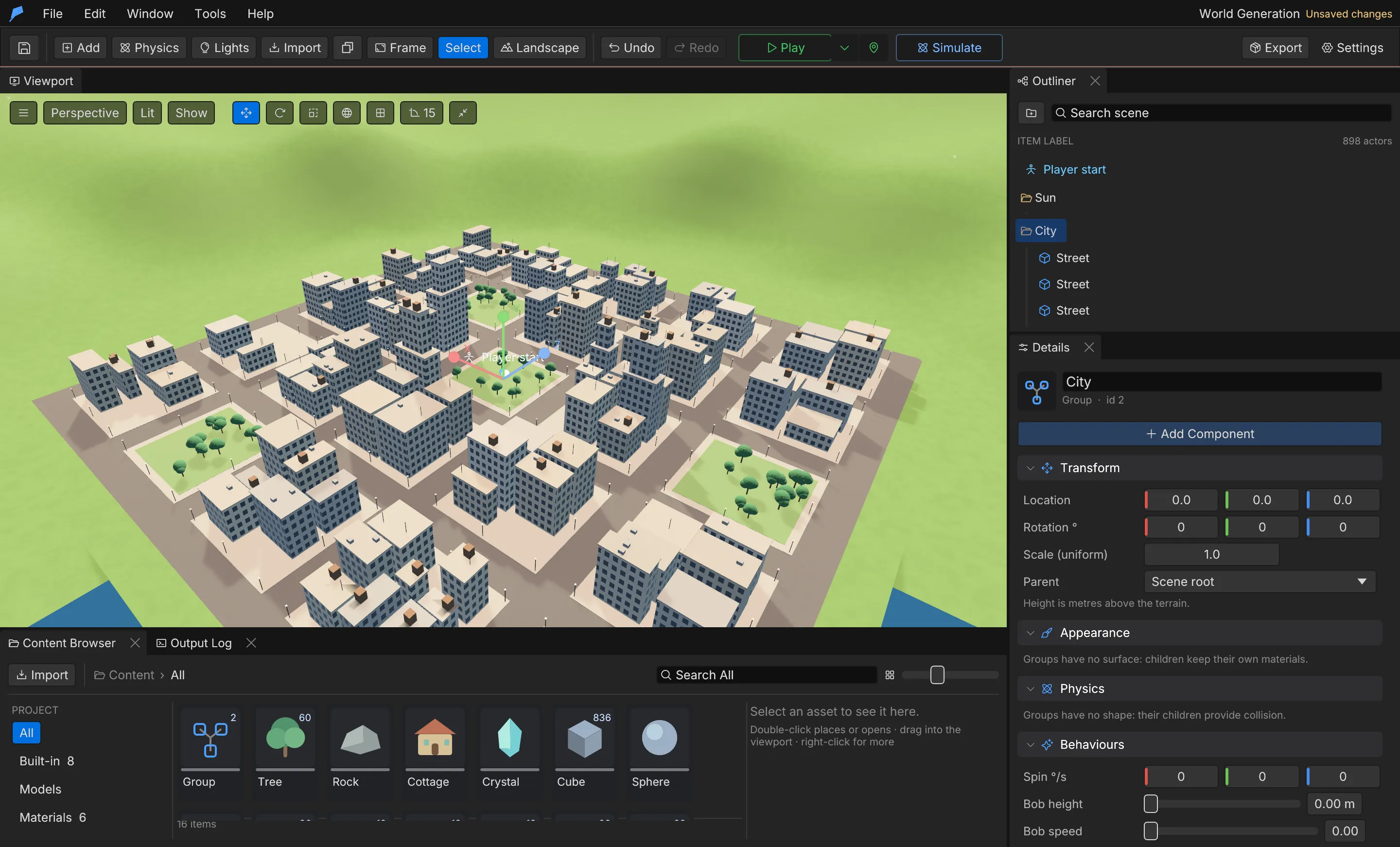
Section titled “Generate a city”city.generate builds a grid of streets and blocks raised on sidewalks. Blocks split into lots
with buildings of varied heights, taller toward downtown, with cornice ledges, stepped towers and
rooftop clutter such as air conditioners, water tanks and antennas. Street lamps have glowing heads,
and some blocks become parks with trees.
The city is one Group of static objects, so it is one undo step and you remove it by deleting the group. Roofs and ledges are walkable, climbable and swingable, and navigation finds them. The ground under the city is levelled and kept clear of grass and wild trees.
Start from a preset and override any field:
| Preset | Layout |
|---|---|
town |
3 × 3 blocks of 1–4 storey houses and shops, wide parks |
city |
5 × 5 blocks, 2–14 storeys, a modest downtown. These are the defaults |
metropolis |
8 × 8 blocks, towers up to 45 storeys around a tight downtown |
| Field | Range | Default |
|---|---|---|
seed |
0–4,294,967,295 | 1 |
center |
[x, z] m | [0, 0] |
blocks |
1–24 each axis | [5, 5] |
block_size |
16–120 m | 44 |
street_width |
4–40 m | 12 |
storeys |
1–120, [lowest, highest] | [2, 14] |
storey_height |
2.5–6 m | 3.4 |
downtown |
0 (random) – 1 (tight downtown) | 0.6 |
density |
0–1, share of each block that is built on | 0.85 |
parks |
0–1, share of blocks that are parks | 0.12 |
rooftops |
0–1, rooftop clutter | 0.6 |
setbacks |
0–1, stepped towers | 0.5 |
lamps |
On/off | On |
palette |
Up to 32 sRGB facade colours | Six warm and cool off-whites |
street_color, sidewalk_color |
sRGB | Dark grey, light grey |
flatten |
On/off | On |
windows |
On/off | On |
Night windows
Section titled “Night windows”With windows on, each facade colour gets a Facade Windows material: a window grid on the walls,
with some windows lit warm at night. It is a regular material graph
template, so you can edit it like any other material or apply it to your own buildings.
The command returns the city group, building and park counts, the tallest height, and the ten tallest rooftops as [x, y, z] positions. Use them to start the player or a mission on a roof.
Limits
Section titled “Limits”- Generated level objects exist only during Play and are removed on Stop.
- A city has at most 24 × 24 blocks and 120 storeys.
city.generatehas no editor panel; run it from the CLI or an agent.
Automate it
Section titled “Automate it”This generates a metropolis with a fixed seed and red-brick facades:
feather-cli --connect .feather-session.json command city.generate \ --json '{"preset":"metropolis","seed":42,"center":[0,0],"palette":[[0.62,0.32,0.26],[0.7,0.4,0.32]]}'To change a level recipe, write the data table with data.set and read it back with data.get:
feather-cli --connect .feather-session.json command data.get \ --json '{"name":"levelgen"}'See Agents & automation for connecting a live session.