Effects
Particle effects are data-driven: each effect has up to eight emitters that throw low-poly particles with a lifetime, speed, gravity, size and colour over life, plus an optional light flash and sound. Decals lay marks such as scorches, cracks and puddles on surfaces. Objects play both through components, and scripts spawn them at runtime.
Create an effect
Section titled “Create an effect”- Open Window → Effects · particles.
- Type an ID in the new effect id field and click Add effect. IDs use letters, digits,
-and_. - Edit the effect’s emitters, light and sound.
- Click Preview to play the saved effect at the camera’s focus.
- Click Apply to commit, or Revert to discard. Delete effect removes an effect that no object uses.
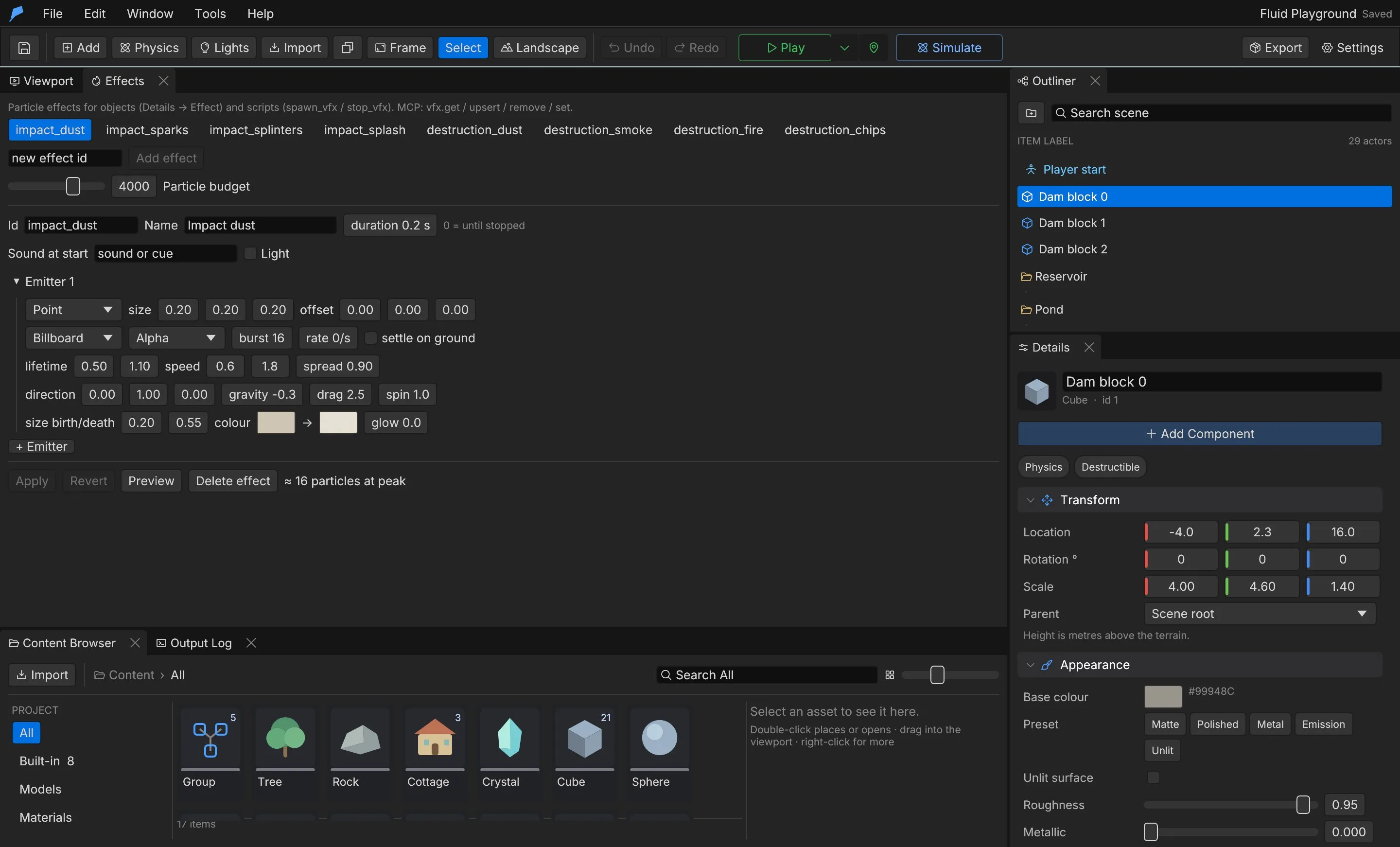
Effect settings
Section titled “Effect settings”| Setting | Description | Default |
|---|---|---|
| Name | Display name | — |
| Duration | Seconds the emitters run, 0 to 600; 0 runs until stopped | 0 |
| Sound at start | A project sound or cue played when the effect starts | None |
| Light | An optional flash of light: colour, intensity (0 to 1,000,000), range (0.1 to 200 m) and flicker (0 steady to 1 wild) | Off |
New lights default to a warm colour, intensity 20,000, range 8 m and flicker 0.4.
Emitters
Section titled “Emitters”| Setting | Description | Default | Range |
|---|---|---|---|
| Shape | Point, Sphere, Disc (on the ground plane) or Box | Point | — |
| Size | Sphere or disc radius in X, or box half extents | 0.2 m | ±1,000 m |
| Offset | Position relative to the effect | [0, 0, 0] |
±1,000 m |
| Mesh | Cube, Sphere or Billboard (always faces the camera) | Cube | — |
| Blend | Opaque; Additive adds light (fire, sparks, magic); Alpha is see-through (smoke, dust, mist) | Additive | — |
| Burst | Particles emitted at once when the effect starts | 0 | 0 to 2,000 |
| Rate | Particles per second while the effect runs | 20 | 0 to 2,000 |
| Lifetime | [min, max] seconds |
0.6 to 1.2 | 0.01 to 60 |
| Speed | [min, max] |
0.5 to 1.5 | 0 to 200 |
| Direction | Main direction, in local space | Up | — |
| Spread | 0 is exactly along the direction, 1 is any direction | 0.3 | 0 to 1 |
| Gravity | Metres per second², downward; negative values rise | −1 | ±100 |
| Drag | Slows particles over time | 1 | 0 to 50 |
| Particle size | Size at birth and at death, in metres | 0.08 to 0.02 | 0 to 20 |
| Colour start, colour end | Colour over life, RGB 0 to 1 | Orange to red | — |
| Glow | Emissive strength for bloom; 0 is lit normally | 6 | 0 to 200 |
| Spin | Rotation speed | 3 | 0 to 50 |
| Settle | Stop on the terrain instead of falling through | Off | — |
An emitter must have a burst or a rate above 0.
Play an effect on an object
Section titled “Play an effect on an object”- Select the object.
- In Details, click Add Component and choose Effect.
- Choose the Effect, set an Offset, and turn Play on start on or off.
Decals
Section titled “Decals”A decal is a mark lying on a surface. Add one with Add Component → Decal.
| Setting | Description | Default | Range |
|---|---|---|---|
| Built-in shape / Texture | A procedural shape, or a project texture (PNG with alpha) | Built-in shape | — |
| Shape | splat, scorch, crack, puddle, ring, dirt, footprint or pawprint |
scorch |
— |
| Tint | Colour, RGB | Dark brown | 0 to 1 |
| Opacity | How solid the mark is | 0.9 | 0 to 1 |
| Width, Length | Metres | 2 | 0.01 to 200 m |
| Wetness | 0 is matte, 1 is wet and glossy | 0 | 0 to 1 |
| Follow terrain | Lie on the terrain under the object. Off, the decal lies in the object’s own plane; rotate the object to put it on a wall | On | — |
Script API
Section titled “Script API”| Function | Description |
|---|---|
spawn_vfx(effect, x, y, z), spawn_vfx(effect, at) |
Starts an effect at a position (at is a vec3) and returns a handle |
stop_vfx(handle) |
Stops a spawned effect |
spawn_decal(shape, x, y, z, size, seconds) |
Places a built-in decal shape for a number of seconds, at a random rotation |
spawn_decal(shape, x, y, z, size, seconds, [r, g, b]) |
The same, tinted |
Script decals shrink away over their last two seconds. When more script decals exist than the decal budget allows, the oldest are recycled.
fn on_event(name, data) { if name == "explosion" { spawn_vfx("blast", data.x, data.y, data.z); spawn_decal("scorch", data.x, data.y, data.z, 3.0, 30.0); }}The engine also provides two built-in effects, water_splash and water_spray. A project effect with
the same ID replaces the built-in one.
Budgets and limits
Section titled “Budgets and limits”| Limit | Value | Default |
|---|---|---|
| Particle budget: particles alive at once across all effects | 10 to 50,000 | 4,000 |
| Script decals alive at once | 0 to 5,000 | 256 |
| Effects per project | 256 | — |
| Emitters per effect | 1 to 8 | — |
vfx.get and vfx.upsert report each effect’s peak particle count, so you can check an effect against
the budget before you use it.
Automate it
Section titled “Automate it”| Command | Purpose |
|---|---|
vfx.get |
Lists effects, the particle budget and which objects play which effect; id returns one effect |
vfx.upsert |
Creates or patches an effect (JSON merge; arrays replace); rename_from renames it |
vfx.remove |
Deletes an effect that no object uses |
vfx.set |
Sets max_particles and max_decals |
Create a short spark burst with a light flash:
feather-cli --connect .feather-session.json command vfx.upsert --json '{ "value": { "id": "sparks", "name": "Sparks", "duration": 0.5, "light": {"color": [1.0, 0.7, 0.3], "intensity": 15000, "range": 6, "flicker": 0.6}, "emitters": [{ "shape": "Sphere", "size": [0.1, 0.1, 0.1], "mesh": "Cube", "blend": "Additive", "burst": 60, "rate": 0, "lifetime": [0.3, 0.8], "speed": [3, 8], "spread": 1, "gravity": 9.8, "particle_size": [0.05, 0.01], "color_start": [1.0, 0.9, 0.5], "color_end": [1.0, 0.3, 0.05], "glow": 12 }] }}'See Agents & automation for connecting a live session.