Feather plays imported sounds from objects, as project-wide music and ambience, and from scripts. A mixer routes every sound through a bus, picks variations through cues, ducks one bus under another, muffles sounds behind walls and adds echoes inside reverb zones. Audio plays during Play and in exported games.
Import sounds
Section titled “Import sounds”- Open World & terrain → Audio.
- Click Import sound… and choose an OGG, WAV or MP3 file.
- The sound appears under Sound assets, where you can rename or remove it.
A project holds up to 2,000 sounds of up to 64 MiB each. Each file is stored once, by content hash.
Music and ambience
Section titled “Music and ambience”The Audio tab also sets project-wide sound:
| Setting | Description | Default |
|---|---|---|
| Master volume | Scales everything | 1 |
| Music | A sound that plays as the music loop | None |
| Music volume | Linear, 0 to 4 | 0.5 |
| Day ambience, Night ambience | Ambience beds that cross-fade with the time of day | None |
| Ambience volume | Linear, 0 to 4 | 0.6 |
Music plays on the music bus and the ambience beds on the ambience bus.
Sound emitters
Section titled “Sound emitters”A Sound component makes an object play a sound, such as a river, a forge or tavern music.
- Select the object.
- In Details, click Add Component and choose Sound.
- Pick the sound and set its options.
| Setting | Description | Default | Range |
|---|---|---|---|
| Volume | Linear; 1 is the original level | 1 | 0 to 4 |
| Pitch | Playback rate | 1 | 0.25 to 4 |
| Loop | Repeat the sound | On | — |
| Play on start | Start when Play begins; otherwise a script starts it | On | — |
| Positional | Heard only within Range of the object; otherwise heard everywhere | On | — |
| Range | Distance in metres | 25 | 1 to 2,000 |
| Plays | Always, Day or Night | Always | — |
The mixer
Section titled “The mixer”Open Window → Mixer · buses, cues, reverb to edit buses, cues, ducking, occlusion and reverb zones. Click Apply to commit your changes or Revert to discard them.
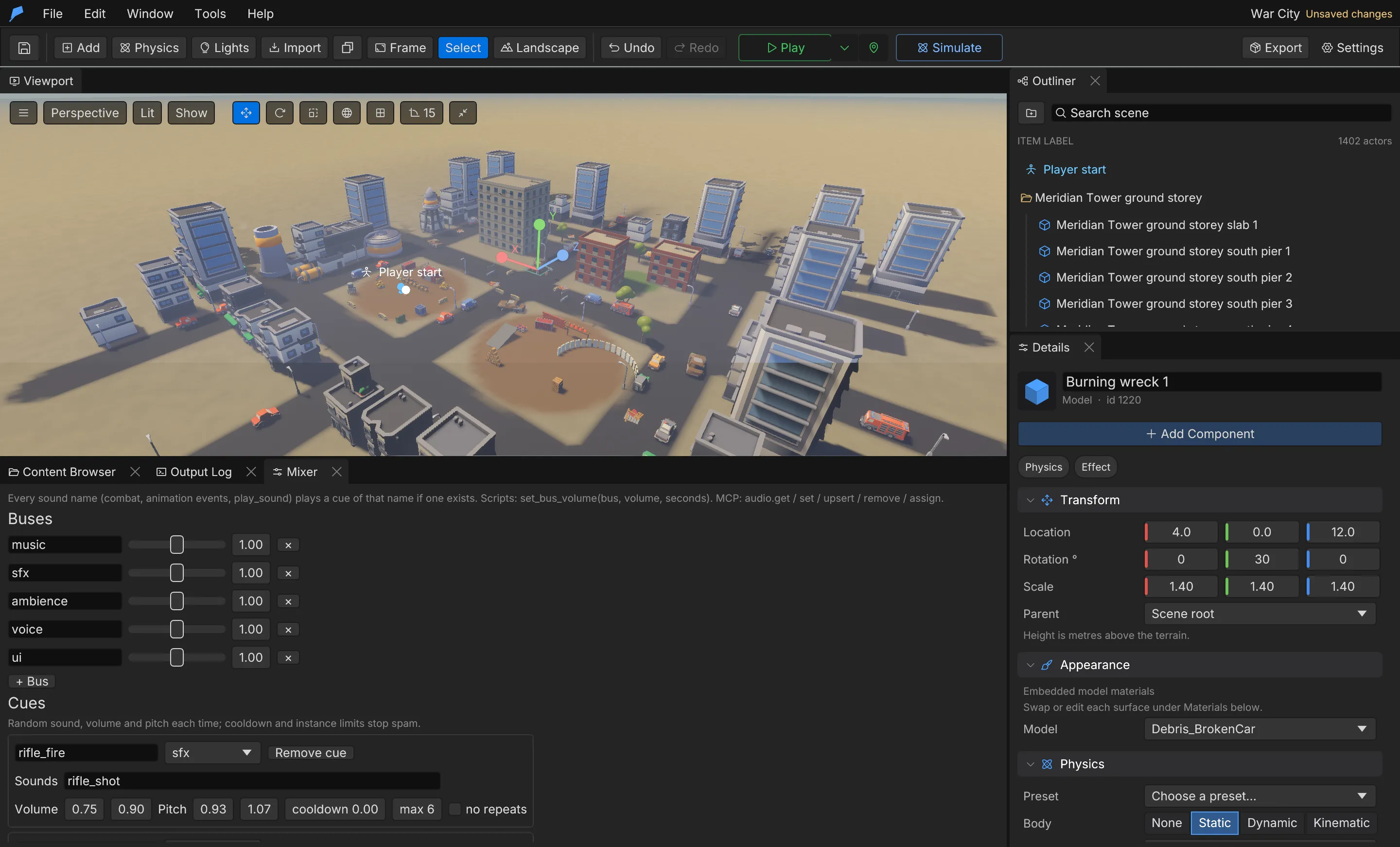
Every project has five buses: music, sfx, ambience, voice and ui. You can add more. Each bus
has a linear volume from 0 to 4. Under Sound buses, choose the bus each sound plays on; sounds
without one play on sfx.
Players set music, effects and voice volumes in the pause menu of an exported game.
While the camera is under water, everything on the other buses is muffled (music only slightly — the
ui bus is not) and a muffled ambience, dive and surface splashes and breath bubbles play. Those
levels and the project sounds that can replace the built-in ones live with the water look — see
Underwater and swimming.
A cue is a named set of variations. Playing the cue picks one of its sounds at random, with a random
volume and pitch inside the ranges you set. Use cues for gunshots, footsteps and impacts. Wherever a
sound name is accepted, such as in combat settings, animation events or play_sound, a cue with that
name is used first.
| Setting | Description | Default | Range |
|---|---|---|---|
| Sounds | Sounds to pick from | — | 1 to 32 |
| Volume | [min, max] |
0.9 to 1.0 | 0 to 4 |
| Pitch | [min, max] |
0.95 to 1.05 | 0.25 to 4 |
| Bus | Overrides the picked sound’s bus | The sound’s bus | — |
| Max instances | How many can play at once; 0 is unlimited | 0 | — |
| Cooldown | Seconds before the cue can play again | 0 | 0 to 60 s |
| Avoid repeat | Never picks the same sound twice in a row | On | — |
Ducking
Section titled “Ducking”A ducking rule makes a target bus quieter while a sound plays on a trigger bus. New projects duck
music under voice.
| Setting | Description | Default | Range |
|---|---|---|---|
| Target | The bus that gets quieter | music |
— |
| Trigger | The bus that causes it | voice |
— |
| Amount | Volume multiplier while ducked | 0.4 | 0 to 1 |
| Attack | Seconds to duck | 0.15 | 0 to 10 s |
| Release | Seconds to recover | 0.8 | 0 to 10 s |
Occlusion
Section titled “Occlusion”Walls between the listener and a positional sound make it quieter. Occlusion is on by default.
| Setting | Description | Default | Range |
|---|---|---|---|
| Amount | Volume multiplier behind a wall | 0.45 | 0 to 1 |
| Interval | Seconds between checks per sound | 0.15 | 0.02 to 5 s |
Reverb zones
Section titled “Reverb zones”While the listener is inside a reverb zone, sounds get echo taps. Use them for halls, crypts and caves.
| Setting | Description | Default | Range |
|---|---|---|---|
| Center | World position in metres | [0, 0, 0] |
— |
| Radius | Metres | 20 | 0.5 to 5,000 |
| Echoes | Taps after each sound | 3 | 0 to 6 |
| Delay | Seconds between taps | 0.09 | 0.01 to 2 s |
| Volume | Volume of the first tap | 0.35 | 0 to 1 |
| Decay | How much quieter each tap is than the last | 0.55 | 0 to 1 |
Script API
Section titled “Script API”| Function | Description |
|---|---|
play_sound(name) |
Plays a sound or cue |
play_sound_at(name, x, y, z) |
Plays a sound or cue at a world position |
set_bus_volume(bus, volume) |
Sets a bus volume |
set_bus_volume(bus, volume, seconds) |
Fades a bus to a volume over time |
play_music(name) |
Swaps the music loop for a project sound, by name or ID; "" is silence |
reset_music() |
Goes back to the project’s Music |
play_music changes which sound plays as the music loop, on the music bus. A name that matches no
sound also plays silence.
Games with their own options screen can read and change the player’s volumes with user_settings()
and set_user_setting; see Game UI.
fn on_event(name, data) { if name == "boss_intro" { set_bus_volume("music", 0.0, 2.0); play_sound("boss_roar"); } if name == "boss_fight" { set_bus_volume("music", 1.0, 0.5); play_music("boss_theme"); } if name == "boss_defeated" { reset_music(); }}Automate it
Section titled “Automate it”| Command | Purpose |
|---|---|
sound.import |
Imports an OGG, WAV or MP3 from the workspace as a project sound |
audio.get |
Reads the mixer and every sound with its bus |
audio.set |
Patches audio settings (JSON merge; arrays replace) |
audio.upsert |
Creates or patches one bus, cue or reverb zone by name |
audio.remove |
Removes a bus, cue or reverb zone |
audio.assign |
Puts a sound on a bus |
Create a footstep cue with three variations:
feather-cli --connect .feather-session.json command audio.upsert --json '{ "kind": "cue", "value": { "name": "footstep", "sounds": ["step_1", "step_2", "step_3"], "volume": [0.8, 1.0], "pitch": [0.9, 1.1], "bus": "sfx", "cooldown": 0.1 }}'See Agents & automation for connecting a live session.