Player and traversal
Every Feather project has a playable character. It walks, runs, sprints, jumps, crouches, climbs, mantles and swims out of the box, in first person or as a third-person avatar. On top of that you can switch on traversal abilities — rope swinging, grapple zips, wall-running, charged jumps, gliding and flight — and tune how all of it feels. Input goes through named actions that work on keyboard, mouse and gamepad, and players can rebind them.
Everything here is project data, edited in the editor or through project.player, feel.*,
traversal.* and input.* commands.
What’s included
Section titled “What’s included”- Camera: first person, or third person with an avatar model, an animation library and a camera that pulls in when scenery blocks it.
- Movement: walk, run, sprint and jump speeds; crouching; climbing steep surfaces; mantling onto ledges; swimming in water volumes.
- Stamina for sprinting, climbing and fast swimming.
- Traversal abilities: swing, zip, wall-run, super jump, glide and flight. All are off by default.
- Camera feel: head bob, a field-of-view kick when sprinting, a landing dip and screen shake.
- Footsteps and footprints that match the surface underfoot.
- Input actions with up to four keys and four gamepad buttons each, plus gamepad look settings.
For the shooter movement kit (slide, dash, grapple), see Combat.
Set up the player
Section titled “Set up the player”- Open Window → World & terrain and select the Player tab. The same settings appear in Project settings → Player & camera.
- Under Camera, choose First person or Third person.
- For third person, pick an Avatar model and, optionally, an Animation library. Any imported model with named clips can drive characters that share its skeleton.
- Set the speeds, then expand Locomotion clips to map clip names, or choose an Animation graph.
- Expand Held models (weapons) to attach up to eight models to the avatar’s bones.
- Below the player settings, tune Movement & stamina, Traversal (swing, glide, fly…), Camera feel, Footsteps and Footprints & step effects.
- Press Play.
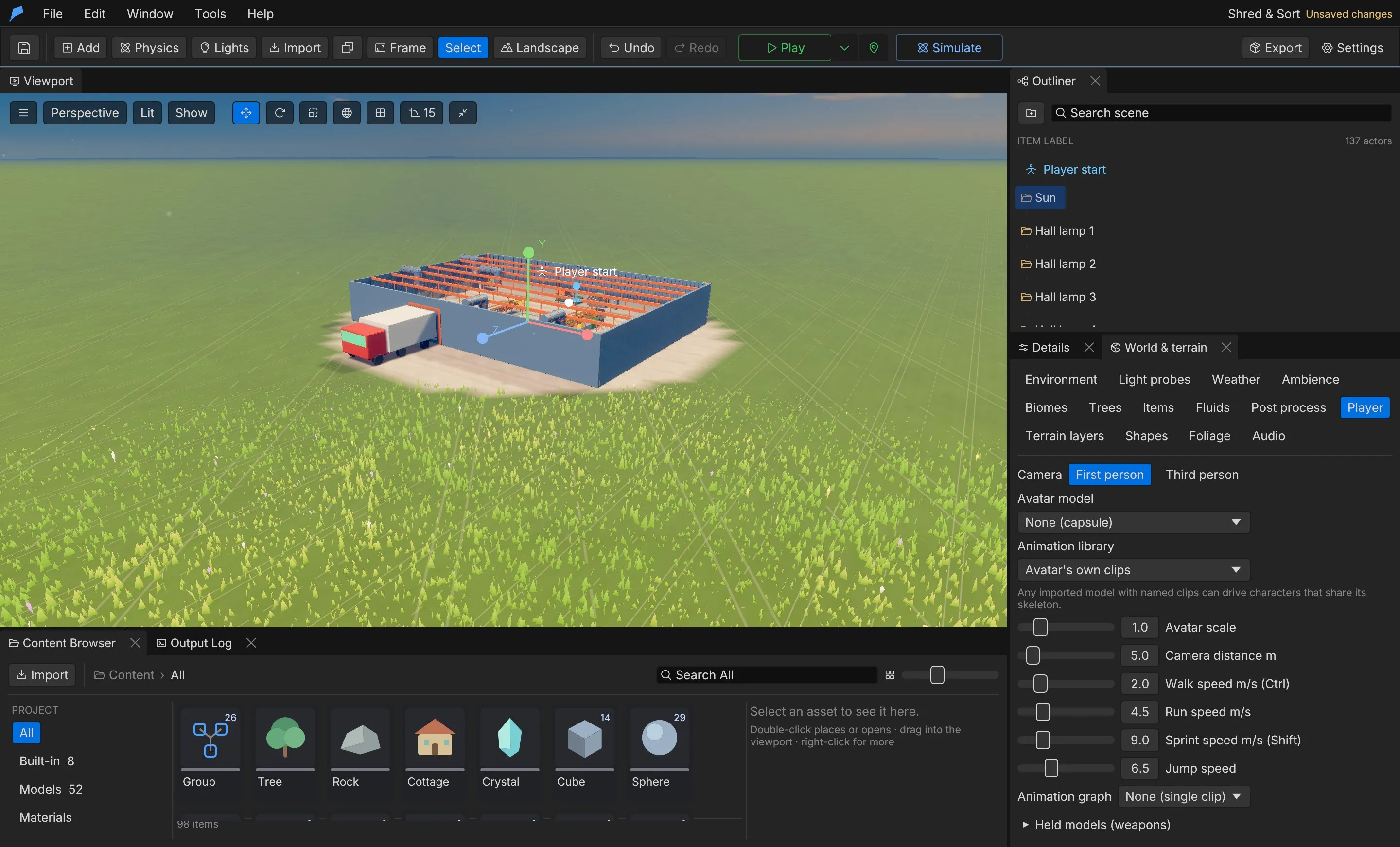
Player settings
Section titled “Player settings”| Setting | Field | Range | Default |
|---|---|---|---|
| Camera | camera |
FirstPerson, ThirdPerson |
FirstPerson |
| Avatar model | avatar_asset_id |
Asset ID | None (capsule) |
| Animation library | animation_library_asset_id |
Asset ID | The avatar’s own clips |
| Avatar scale | avatar_scale |
0.05–20 | 1 |
| Camera distance | camera_distance |
1–40 m | 5 m |
| Walk speed | walk_speed |
0.1–50 m/s | 2 m/s |
| Run speed | run_speed |
0.1–50 m/s | 4.5 m/s |
| Sprint speed | sprint_speed |
0.1–50 m/s | 9 m/s |
| Jump speed | jump_speed |
0–30 m/s | 6.5 m/s |
| Animation graph | animation_graph |
Graph ID | None |
| Held models | attachments |
Up to 8 {model_asset_id, bone, offset, rotation, scale} |
None |
An animation library with different bone names is retargeted onto the avatar automatically. An
animation graph replaces the clip list and receives speed, grounded and vertical_speed every
frame. See Animation graphs.
Locomotion clips
Section titled “Locomotion clips”The defaults match the Character Forge humanoid clip names. A model without a clip keeps playing
its current one. When a model has no Idle_Loop, Walk_Loop or Jog_Fwd_Loop clip, those defaults
fall back to its conventionally named clips, so many downloaded characters animate without setup:
| Default | Falls back to, first match, any letter case |
|---|---|
Idle_Loop |
idle, Idle_A, Idle_01, Breathing Idle |
Walk_Loop |
walk, Walking, Walk_A, Walk_01 |
Jog_Fwd_Loop |
run, jog, sprint, Running, Run_A, Run_01 |
| State | Field | Default clip |
|---|---|---|
| Idle | idle |
Idle_Loop |
| Walk | walk |
Walk_Loop |
| Run | run |
Jog_Fwd_Loop |
| Sprint | sprint |
Sprint_Loop |
| Jump | jump |
Jump_Start |
| Fall | fall |
Jump_Loop |
| Swing | swing |
Swing_Loop |
| Glide | glide |
Glide_Loop |
| Fly | fly |
Fly_Loop |
| Crouch | crouch |
Crouch_Idle |
Movement and stamina
Section titled “Movement and stamina”The player runs by default, sprints while Sprint is held, and walks while Alt is held.
With crouching on, Crouch lowers the capsule and slows the player. Wading through thick fluids
slows the player, and so do deep fresh snow and sand; a trodden track is easier going. Set how much
snow and sand slow walkers with Slows walkers in the Snow & sand section of
Window → World & terrain → Weather (drifts.set slow, 0–0.9, default 0.45).
| Field | Description | Range | Default |
|---|---|---|---|
movement.crouch |
Crouch on the crouch action | On/off | On |
movement.crouch_speed |
Fraction of run speed while crouched | 0.05–1 | 0.5 |
movement.climbing |
Walk into a steep surface to climb it; Jump leaps up, Crouch lets go | On/off | On |
movement.climb_speed |
Climbing speed | 0.1–10 m/s | 1.8 m/s |
movement.climb_tag |
Only objects with this tag are climbable; empty allows any steep surface, terrain included | — | Empty |
movement.mantle |
Jump at a ledge to pull up onto it | On/off | On |
movement.mantle_height |
Highest ledge above the feet | 0.3–4 m | 2 m |
movement.mantle_seconds |
Time to pull up | 0.05–3 s | 0.4 s |
| Stamina field | Description | Default |
|---|---|---|
stamina.enabled |
Stamina limits sprinting, climbing and fast swimming | On |
stamina.max |
Maximum stamina | 100 |
stamina.sprint, climb, swim |
Cost per second | 14, 9, 10 |
stamina.climb_jump |
Cost per climbing leap | 18 |
stamina.regen |
Regained per second | 32 |
stamina.delay |
Seconds before regeneration starts | 0.8 s |
Running out of stamina exhausts the player until it refills completely.
Swimming
Section titled “Swimming”The player swims in any water volume with Player swims turned on. The head floats above the surface; Jump swims up and Crouch dives. Swimming is slower than running, and sprinting in water costs swim stamina. See Water and fluids for water volumes.
Traversal abilities
Section titled “Traversal abilities”Turn abilities on in Traversal (swing, glide, fly…), or choose All abilities on (superhero) to enable all six. They use the actions every project already has, and momentum carries between them: let go of a swing at the bottom of the arc and you fly on.
| Ability | Control |
|---|---|
| Swing | Hold Grapple (F) in the air; W pumps the swing, release to let go with a boost |
| Zip | Ability (Q) pulls you to the point you aim at; a ledge there pops you up |
| Wall-run | Hold Sprint in the air beside a wall; Jump kicks off |
| Super jump | Hold Crouch on the ground to charge, then Jump |
| Glide | Hold Jump while falling |
| Flight | Double-tap Jump in the air; Jump rises, Crouch dives, Sprint boosts; land or double-tap again to stop |
| Field | Description | Range | Default |
|---|---|---|---|
swing |
Rope swinging from anything solid up and ahead | On/off | Off |
swing_range |
How far up and ahead a rope can catch | 5–120 m | 45 m |
swing_pump |
Pumping and reeling in | 0–40 m/s² | 9 m/s² |
swing_release |
Speed kept and added when letting go | 0.5–2× | 1.15× |
swing_sky |
With nothing to catch, the rope swings from the sky | On/off | Off |
zip |
Grapple zip to the aimed point | On/off | Off |
zip_range, zip_speed |
Reach and speed | 5–150 m, 5–80 m/s | 60 m, 32 m/s |
wall_run |
Run along walls | On/off | Off |
wall_run_speed, wall_run_seconds |
Speed and longest run | 2–30 m/s, 0.2–6 s | 10 m/s, 1.6 s |
wall_jump |
Kick-off speed | 2–25 m/s | 9 m/s |
super_jump |
Charged jump | On/off | Off |
super_jump_height, super_jump_charge |
Height at full charge and charge time | 2–120 m, 0.1–4 s | 18 m, 0.9 s |
glide |
Glide while falling | On/off | Off |
glide_sink, glide_speed |
Sink rate and forward speed | 0.2–10 m/s, 2–60 m/s | 2.2 m/s, 15 m/s |
flight |
Free flight | On/off | Off |
flight_speed, flight_boost |
Speed and Sprint multiplier | 2–120 m/s, 1–5× | 22 m/s, 2.2× |
air_control |
How much you steer momentum after an ability | 0–1 | 0.5 |
Traversal works with the third-person controller, and with the first-person controller when combat is off.
Example: leap off the jetty and glide
Section titled “Example: leap off the jetty and glide”You’ll give the player a charged super jump and a glide, so they can leap high off the jetty and float out over the sea. Start from the Ocean Voyage example project, which has no combat.
- Open Window → World & terrain and select the Player tab.
- Expand Traversal (swing, glide, fly…).
- Turn on Super jump and set Super jump height to 24 m. Leave Charge time at 0.9 s.
- Turn on Glide and set Glide sink to 1.5 m/s. Leave Glide speed at 15 m/s.
- Press Play.
To jump, hold Crouch (Ctrl) for about a second, then press Jump (Space) while still holding Crouch. Releasing Crouch before you press Jump throws the charge away. Keep Jump held after the jump: once you’re falling faster than 1 m/s you start gliding, and W steers the glide forward.
Do the same from the command line
Section titled “Do the same from the command line”feather-cli --workspace /tmp/demo --project project.feather.json command traversal.set \ --json '{"patch":{"super_jump":true,"super_jump_height":24,"glide":true,"glide_sink":1.5}}' \ --save project.feather.jsonCheck it worked
Section titled “Check it worked”In Play, a full charge throws you about 24 m up, and you then sink slowly instead of dropping. A headless run proves it without a renderer. Hold Ctrl from frame 20, press Space at frame 90 (1.2 s of charge), then hold W:
feather-cli --workspace /tmp/demo --project project.feather.json command game.simulate --json '{ "frames": 420, "inputs": [ {"frame": 20, "key": "Ctrl", "pressed": true}, {"frame": 90, "key": "Space", "pressed": true}, {"frame": 91, "key": "W", "pressed": true}, {"frame": 92, "key": "Ctrl", "pressed": false} ]}'The report’s traversal section shows super_jumps: 1, glides: 1, glide_seconds around 3.8,
top_height around 26 and mode: "glide" at the end. player.final.position is about 55 m further
along Z than player.initial.position, and still about 18 m higher: the player is gliding over the
sea when the run ends.
Camera and footsteps
Section titled “Camera and footsteps”| Field | Description | Range | Default |
|---|---|---|---|
camera.head_bob |
First-person head bob | 0–0.3 m | 0.035 m |
camera.fov_kick |
Extra field of view while sprinting | 0–30° | 7° |
camera.landing_dip |
View dip on a hard landing | 0–1 m | 0.18 m |
camera.shake |
Screen shake in both views | 0–2 | 1 |
camera.collision_radius |
Third-person camera collision radius | 0–1 m | 0.25 m |
camera.pull_in, ease_out |
How fast the camera pulls in when blocked and eases back | 0.5–100, 0.1–50 | 20, 3 |
footsteps.enabled, volume |
Footstep sounds | 0–2 | On, 0.55 |
footsteps.stride |
Metres between steps at a run | 0.3–6 m | 1.9 m |
footsteps.landing |
Play a landing sound | On/off | On |
The footstep surface comes from the object’s physics surface or name, or from the terrain. Each
surface — grass, dirt, stone, wood, water, snow, metal or sand — can use your own
sound cue. Dirt, sand and snow leave footprints with a puff of dust by default, and water splashes.
Input actions
Section titled “Input actions”Gameplay reads named actions rather than raw keys. Edit them in Window → Input.
| Action | Keys | Gamepad |
|---|---|---|
move_forward, move_back, move_left, move_right |
W, S, A, D | Left stick |
jump |
Space | South |
sprint |
ShiftLeft | LeftStick |
crouch |
ControlLeft | East |
interact |
E | West |
fire, aim |
Mouse1, Mouse2 | RightTrigger, LeftTrigger |
reload |
R | West |
grenade, ability |
G, Q | RightBumper, LeftBumper |
melee |
V | RightStick |
grapple |
F | North |
throw |
Mouse1 | RightTrigger |
use_tool |
C | DPadDown |
slot_1, slot_2, slot_3 |
1, 2, 3 | DPadLeft, DPadUp, DPadRight |
journal |
J | Select |
pause |
Escape (not rebindable) | Start |
The left stick always moves and the right stick looks. Gameplay data that names an action’s
default key — for example combat.keys.jump = "Space" — follows the action, so gamepad buttons and
player rebinds apply to it. Player rebinds are saved per player, outside the project.
| Gamepad field | Description | Range | Default |
|---|---|---|---|
enabled |
Gamepad input | On/off | On |
deadzone |
Stick dead zone | 0–0.9 | 0.15 |
look_speed |
Turn speed at full right-stick deflection | 1–1080°/s | 200°/s |
look_curve |
Higher values give finer aim near the centre | 0.5–4 | 1.6 |
invert_y |
Invert vertical look | On/off | Off |
Extend it
Section titled “Extend it”| Function | Description |
|---|---|
action_down(id) |
true while an action is held |
action_pressed(id) |
true on the frame an action is pressed |
stamina(), max_stamina(), exhausted() |
Stamina state |
climbing(), crouching() |
Movement state |
tune("feel", patch) |
Changes game feel at runtime, for example a slower crouch in a cutscene |
player_position(), player_forward() |
Where the player is and which way they face |
// A world script: warn the player once each time they run out of stamina.fn update(dt) { let tired = exhausted(); if tired && !get("warned", false) { print("Out of stamina"); } set("warned", tired);}Limits
Section titled “Limits”- Up to four keys and four gamepad buttons per action. Action IDs are 1–48 lowercase letters, digits or underscores.
- Up to eight held models on the avatar.
tunecovers game feel, not traversal; change traversal withtraversal.set.
Automate it
Section titled “Automate it”# Third-person player with a faster sprintfeather-cli --connect .feather-session.json command project.player \ --json '{"camera":"ThirdPerson","camera_distance":4,"sprint_speed":11}'
# Turn on swinging and glidingfeather-cli --connect .feather-session.json command traversal.set \ --json '{"patch":{"swing":true,"swing_range":60,"glide":true}}'
# Allow climbing only on objects tagged "ivy"feather-cli --connect .feather-session.json command feel.set \ --json '{"patch":{"movement":{"climb_tag":"ivy"}}}'
# Add a "dodge" action on Alt and the gamepad's East buttonfeather-cli --connect .feather-session.json command input.upsert \ --json '{"value":{"id":"dodge","label":"Dodge","keys":["AltLeft"],"gamepad":["East"]}}'game.simulate accepts scripted key and stick inputs, so agents can verify movement and traversal
without a renderer. See Simulation.