Physics
Feather simulates rigid bodies with Rapier. Physics is project data: world settings live on the project, and each object carries its own body, collider and optional water, force field, joint and cloth components. The editor, scripts and agents all change the same data through the same commands. The solver runs on several threads.
What’s included
Section titled “What’s included”- Four body types — None, Static, Dynamic and Kinematic — with box, sphere, capsule, convex hull and exact-mesh colliders.
- Twelve one-click body presets, from a 10 kg prop to a 2.5 t heavy body.
- Project gravity, solver substeps and iterations, and wind and gusts that also move foliage, cloth and smoke.
- A balance point per body, so boats and carts stay upright and off-centre loads tip.
- Impact sounds and particles chosen by each body’s surface.
- Joints: weld, hinge, ball, slider, rope and spring, with motors, limits and break forces.
- Force fields: directional, radial and vortex, or a one-shot launch for jump pads.
- Thrusters that push a body along its own axis — rockets, jets, drones — fired by a key, a script, or by themselves to hover at a set height.
- Spawners that stream physics copies of an object during Play: ball pits, falling crates, marbles.
- Cloth that pins to an edge or corners, reacts to wind and collides with the player.
- Sixteen ready-made setups, including water, a car, a ship, a chain and a wrecking ball.
- Simulate, which runs physics in the editor so you can settle objects and keep the result.
Make an object physical
Section titled “Make an object physical”- Select the object.
- In Details → Physics, open Preset and choose a preset such as Crate or Ball, or set Body directly.
- Choose a Collider. For imported models, use From model → Fit box, Mesh or Hull to size the collider from the model.
- Set Surface so impacts play the right sound and effect.
- Press Play, or press Simulate in the toolbar to watch the object fall and settle without the player.
Groups have no shape; their children provide collision. Child objects cannot be Dynamic or Kinematic — unparent an object to let it move on its own.
Bodies
Section titled “Bodies”| Body | Behaviour |
|---|---|
| None | No collision |
| Static | Solid scenery that never moves |
| Dynamic | Moved by gravity, contacts, forces and impulses |
| Kinematic | Moved by scripts or animation; pushes dynamic bodies |
Body settings
Section titled “Body settings”| Setting | Field | Range | Default |
|---|---|---|---|
| Collider | collider |
Box, Sphere, Capsule, ConvexHull, Mesh | Box |
| Half extents | half_extents |
Above 0 to 1000 m per axis | 0.5 m |
| Centre offset | center |
−1000 to 1000 m | 0 |
| Friction | friction |
0–10 | 0.7 |
| Bounce | restitution |
0–1 | 0.05 |
| Mass | mass |
Above 0 to 1,000,000 kg | 1 kg |
| Sensor | sensor |
On/off | Off |
| Gravity scale | gravity_scale |
−10 to 10; negative rises | 1 |
| Linear damping | linear_damping |
0–100 | 0 |
| Angular damping | angular_damping |
0–100 | 0 |
| Continuous collision | ccd |
On/off | Off |
| Lock movement | lock_position |
Per world axis | Off |
| Lock rotation | lock_rotation |
Per world axis; lock X and Z to stay upright | Off |
| Surface | surface |
Default, Wood, Metal, Stone, Dirt, Glass, Flesh | Default |
| Settle after | settle |
0–10 s in the panel, up to 60 by command | 0 (never) |
| Air (flat plate) | aero |
0–2 in the panel, up to 4 by command | 0 (off) |
| Centre of mass | center_of_mass |
±100 m per axis, local; null is the middle of the shape |
null |
The gravity scale, damping, continuous collision, lock and balance point settings appear under Advanced for Dynamic bodies. Mesh colliders use the model’s exact triangles and are not available on Dynamic bodies; use Convex hull instead.
Settle after turns a body that has lain still that many seconds static, so a big pile stops
costing physics time and no longer keeps its neighbours awake; it becomes dynamic again when
something disturbs it — the player, a script impulse, an explosion, or a faster body passing close.
Air (flat plate) is flat-plate air resistance for thin objects: paper, leaves and cards catch the
air across their flat side and flutter or glide instead of dropping; 1 behaves like a sheet of
paper.
Turn on Own balance point to set Centre of mass m, in the object’s local metres, scaled with the object; the toggle starts it a quarter of the collider’s height below the centre. A low balance point keeps boats, carts and roly-poly toys upright; an off-centre one makes things tip.
A Sensor reports overlaps and blocks nothing. Scripts and Blueprints receive those overlaps and solid contacts as events — see Contact events.
Presets
Section titled “Presets”| Preset | Result |
|---|---|
none |
No physics |
static |
Solid scenery |
prop |
Dynamic, 10 kg; tumbles and floats |
crate |
Dynamic box, 25 kg, wood surface; floats |
heavy |
Dynamic, 2,500 kg, stone surface; sinks |
ball |
Dynamic sphere, 2 kg, bounce 0.8, continuous collision |
ice |
Friction 0.02; keeps the current body type |
balloon |
Dynamic, 0.5 kg, gravity scale −0.15; rises gently |
projectile |
Dynamic, 0.5 kg, metal surface, continuous collision |
platform |
Kinematic |
trigger |
Sensor volume |
ragdoll_part |
Dynamic, 8 kg, damped; for joint chains |
World settings
Section titled “World settings”Open Window → Physics and expand World. Gravity has Earth, Mars, Moon, Zero-G and Heavy presets; wind has Calm, Breeze, Windy and Storm.
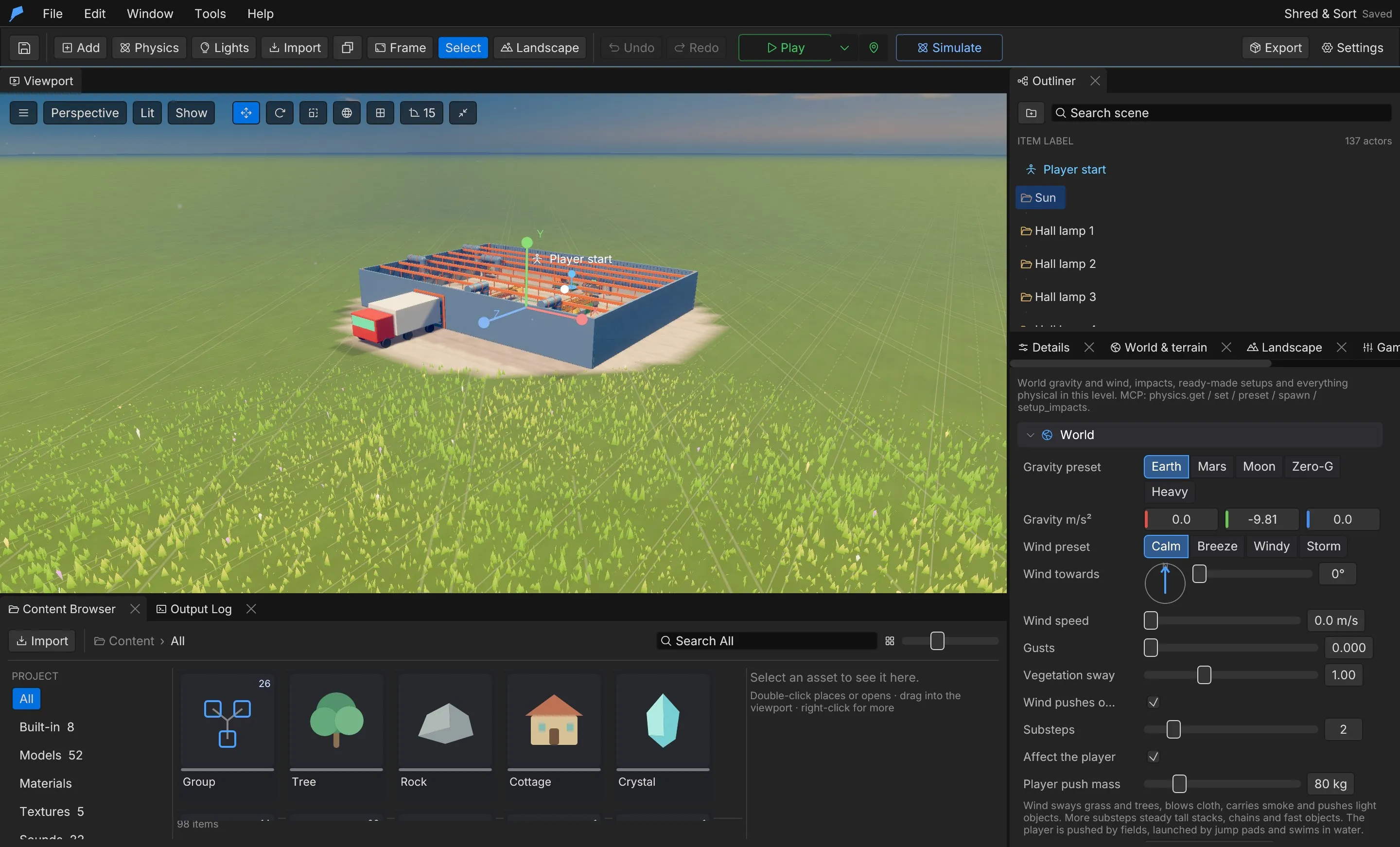
| Setting | Field | Range | Default |
|---|---|---|---|
| Gravity | gravity |
−100 to 100 m/s² per axis | [0, −9.81, 0] |
| Substeps | substeps |
1–8 per frame | 1 |
| Solver iterations | solver_iterations |
1–16 per step; command only | 4 |
| Continuous-collision substeps | ccd_substeps |
1–8; command only | 1 |
| Wind | wind |
−60 to 60 m/s per axis | [2, 0, 1] |
| Gust | gust |
0 (steady) to 1 | 0.4 |
| Foliage sway | foliage_sway |
0–3 | 1 |
| Wind pushes bodies | wind_pushes_bodies |
On/off | On |
| Affect the player (force fields and water push, launch and float the player) | affect_player |
On/off | On |
| Player push mass | player_push |
0–2000 kg; 0 cannot push | 80 kg |
More substeps steady tall stacks, chains and fast objects at a higher cost. More solver iterations
keep tall stacks, chains and ragdolls stiff; fewer are cheaper for big piles. More
continuous-collision substeps catch fast bodies with Continuous collision on that bounce between
thin walls within one frame. Set both with physics.set.
Impacts
Section titled “Impacts”When a body loses speed faster than a rule’s minimum, Feather plays the sound and effect for its surface. Harder hits are louder, and Water plays when a body splashes into a water volume. Surfaces without a rule fall back to Default.
In Physics → Impacts, edit one rule per surface:
| Field | Description | Range | Default |
|---|---|---|---|
surface |
Default, Wood, Metal, Stone, Dirt, Glass, Flesh or Water | — | — |
sound |
A project sound or audio cue; empty plays nothing | — | Empty |
effect |
A particle effect id; empty spawns nothing | — | Empty |
min_speed |
Speed lost in one frame that counts as an impact, in m/s | 0.2–50 | 2.5 |
volume |
Playback volume | 0–2 | 1 |
physics.setup_impacts creates a starter set: the effects impact_dust, impact_sparks,
impact_splinters and impact_splash, and a rule per surface that matches your project’s sounds
by name. Tune the effects in Effects.
Joints
Section titled “Joints”A joint connects an object with a body to another body, or to the world. Add one with Details → Add Component → Joint.
| Kind | Use |
|---|---|
| Fixed (weld) | Welds two objects; breakable welds make destructible structures |
| Hinge | Rotates around an axis: doors, wheels, levers |
| Ball | Rotates freely around the anchor: chains, pendulums |
| Slider | Slides along an axis: pistons, drawers, lifts |
| Rope | Stays within a maximum length |
| Spring | Pulls back to a rest length |
| Field | Description | Default |
|---|---|---|
target |
Object id to attach to; null attaches to the world |
World |
anchor |
Attachment point on this object, local metres | [0, 0, 0] |
target_anchor |
Point on the target, or an offset from the start position when attached to the world | Same as anchor |
axis |
Hinge and slider axis, local | [0, 1, 0] |
limits |
Hinge degrees (−360 to 360) or slider metres, [min, max] |
None |
length |
Rope maximum or spring rest length, 0–1000 m; 0 uses the starting distance | 0 |
stiffness |
Spring stiffness, N/m | 400 |
damping |
Spring damping | 20 |
motor_speed |
Hinge °/s or slider m/s; 0 is off | 0 |
motor_force |
Motor strength, N | 1000 |
break_force |
Breaks above this force, N; 0 never breaks | 0 |
collide_connected |
The two objects still collide with each other | Off |
Joints connect when Play or Simulate starts. Use the crosshair buttons beside Attached to and Anchor to pick the target and anchor in the viewport.
Force fields
Section titled “Force fields”A force field pushes bodies, cloth and, optionally, the player inside a sphere or box. Add one with Details → Add Component → Force field.
| Field | Description | Default |
|---|---|---|
kind |
Directional pushes along a direction; Radial pushes away from the centre (negative pulls in); Vortex swirls around the up axis; Wind blows air at strength m/s, so light, flat things fly and dense ones barely move; Conveyor carries bodies along the direction at up to strength m/s, whatever their mass |
Directional |
shape |
Sphere (size[0] is the radius) or Box (half extents) |
Sphere |
size |
Local metres, up to 2000, scaled by the object | [4, 4, 4] |
direction |
Local push direction for directional fields | [0, 1, 0] |
strength |
Acceleration in m/s², −500 to 500; mass does not matter | 12 |
launch |
Sets this speed once on entry instead, in m/s (a jump pad) | Off |
falloff |
Weaker towards the edge | On |
affects_bodies, affects_cloth, affects_player |
What the field moves | On |
enabled |
Whether the field is active | On |
offset |
Where the field sits relative to its object, local metres | [0, 0, 0] |
tag |
Only bodies with this tag feel the field; empty affects every body. Cloth and the player ignore it | Empty |
Example: a launch pad on the jetty
Section titled “Example: a launch pad on the jetty”You’ll add a pad that throws the player into the air when they walk onto it. Start from the Ocean Voyage example project: you spawn on the jetty facing along it, and the pad goes a few steps ahead.
- Right-click the viewport and choose Add here → Cube.
- In Details, set the name to Launch pad. Under Transform, set Location to 0, 15.35, 51 and Scale to 2, 0.2, 2. The cube keeps its default Static body, so the player can stand on it.
- Click Add Component → Force field.
- In the Force field section, leave Kind on Directional and Direction on 0, 1, 0. Set Shape to Box and Half size m to 0.5, 8, 0.5.
- Turn on Launch on entry, set Launch speed to 16 m/s, and turn off Falloff.
- Press Play and walk forward onto the pad.
The half size is scaled by the object, so the field is 2 m wide and 3.2 m tall. It has to be that tall: the field tests the centre of the player’s capsule, about 0.9 m above their feet.
Do the same from the command line
Section titled “Do the same from the command line”scene.add returns the new object’s ID; use it in scene.update (it is 36 in a fresh copy of
Ocean Voyage).
feather-cli --workspace /tmp/demo --project project.feather.json command scene.add \  --json '{"kind":"Cube","name":"Launch pad","position":[0,15.35,51]}' --save project.feather.json
feather-cli --workspace /tmp/demo --project project.feather.json command scene.update \  --json '{"id":36,"patch":{"scale":[2,0.2,2],"force_field":{"shape":"Box","size":[0.5,8,0.5],"direction":[0,1,0],"launch":true,"strength":16,"falloff":false}}}' \  --save project.feather.json
Check it worked
Section titled “Check it worked”In Play, stepping onto the pad throws you straight up, about 7 m above the jetty. Without a renderer, walk forward for 1.5 seconds and compare the player’s highest point with a run of the unchanged project:
feather-cli --workspace /tmp/demo --project project.feather.json command game.simulate --json '{ "frames": 240, "inputs": [ {"frame": 10, "key": "W", "pressed": true}, {"frame": 100, "key": "W", "pressed": false} ]}'player.max_height rises from about 2.6 (the starting height on the jetty) to about 9.3, and
success is true.
Common problems
Section titled “Common problems”- The player walks over the pad without launching. The field box doesn’t reach the capsule centre. Increase the Y half size, or raise the field with Offset.
- Nothing reacts to the field. Check Enabled and the Affects toggles, and that Affect the player is on in Window → Physics → World if the player should feel it.
- Only some bodies are pushed. A field with Only tag set affects only bodies with that tag.
Thrusters
Section titled “Thrusters”A thruster pushes a Dynamic body along one of its own axes, at a point on it: rockets, jets, propellers, drones and hover pads. Add one with Details → Add Component → Thruster. Adding it to a body that isn’t dynamic applies the Crate preset, and the force starts at 1.5 times the body’s weight; the panel shows that weight, so you can see how much force lifts it.
A thruster fires at full throttle while its Fire with key (SPACE, E, MOUSELEFT…) or input
action is held; otherwise it runs at the throttle a script set, or its starting Throttle. An
At point m away from the centre also turns the body, and Turn N·m adds a spin of its own,
like a reaction wheel.
| Setting | Field | Range | Default |
|---|---|---|---|
| Force | force |
0–1,000,000 N at full throttle | 200 N |
| Push along | direction |
The body’s own axis; any non-zero vector | [0, 1, 0] |
| At point m | offset |
±100 m per axis, local | [0, 0, 0] |
| Turn N·m | torque |
±1,000,000 N·m about each local axis | [0, 0, 0] |
| Throttle | throttle |
0–1, when Play starts | 0 |
| Fire with | key |
A key or input action, up to 64 characters; empty for none | Empty |
| Hover height | hover |
0–50 m in the panel, up to 500 by command; 0 is off | 0 |
| Hover firmness | hover_stiffness |
0.1 (floaty) to 10 (stiff) | 1 |
| Spool | spool |
0–3 s in the panel, up to 10 by command; 0 is instant | 0.15 s |
With Hover height above 0, the thruster throttles itself to hold the body that far above whatever is under it — ground, floors or water — and holds its attitude like a drone, turning the thrust axis back up so a nudge or a wave doesn’t flip it. A 1 kg body needs about 10 N to hover on Earth gravity.
Spawners
Section titled “Spawners”A spawner emits physics copies of another object during Play, as a steady stream or in bursts: ball pits, falling crates, marbles, debris rain, factory feeders. Add one with Details → Add Component → Spawner, then pick the object to copy in Copies. Park that template out of sight. Copies appear anywhere in the spawner’s area box, leave along its own direction, and are removed when Play stops.
| Setting | Field | Range | Default |
|---|---|---|---|
| Copies | template |
An object in this level | None |
| Active | active |
Running when Play starts | On |
| Rate | rate |
0–100 copies per second in the panel, up to 500 by command | 2 |
| Burst at start | burst |
0–500 copies at once when Play starts | 0 |
| Most alive | max_alive |
1–3000; the oldest copy goes to make room | 200 |
| Lifetime | lifetime |
0–120 s in the panel, up to 3600 by command; 0 keeps copies until Stop | 0 |
| Total (0 = endless) | total |
0–10,000 in the panel, up to 1,000,000 by command | 0 |
| Launch speed | speed |
0–60 m/s in the panel, up to 200 by command | 0 |
| Direction | direction |
The spawner’s own axis | [0, −1, 0] |
| Spread | spread |
0–180° random cone around the direction | 10° |
| Area half size m | area |
0–500 m per axis, local | [0.5, 0, 0.5] |
| Spin | spin |
0–20 rad/s random spin in the panel, up to 50 by command | 1 |
| Size variety | size_variety |
0 (all the same) to 0.9; mass follows the size | 0 |
| Body | body |
Dynamic, Static, Kinematic or None | Dynamic |
At most 3000 spawner copies are alive at once across the level; further copies are refused and a runtime message reports it.
Cloth is a rectangle of particles in the object’s local XY plane. It simulates while you edit, reacts to the project wind and force fields, and collides with the ground, the player and moving bodies.
| Field | Description | Range | Default |
|---|---|---|---|
pin |
Top edge, Left edge, top Corners, or None (drops and drapes) |
— | Top |
size |
Width and height | 0.1–100 m | [2, 3] |
resolution |
Particles across and down | 2–48 | [10, 14] |
stiffness |
0 silky to 1 stiff canvas | 0–1 | 0.8 |
damping |
0 keeps swinging to 1 stops at once | 0–1 | 0.03 |
gravity_scale |
Weight | −2 to 4 | 1 |
wind |
Response to wind and fields | 0–5 | 1 |
color |
sRGB colour when no material is set | 0–1 | — |
material |
A project material id | — | None |
collide |
Collide with the ground, player and bodies | — | On |
Ready-made setups
Section titled “Ready-made setups”Add any setup from the toolbar Physics menu, from Physics → Add to the level, or by dragging it from Content Browser → Physics setups. Each is placed at the camera focus.
| Setup | What you get |
|---|---|
water |
A 20 × 20 m pool of buoyant, swimmable water with a crate |
river |
A water channel with a current |
ocean |
An endless sea at that height |
ship |
A sailing ship with a helm; see Vehicles and boats |
car |
A car on raycast wheels; see Vehicles and boats |
flag, banner, curtain |
Cloth on a pole, pinned along the top, or one the player pushes through |
wind_zone |
A box of wind |
jump_pad |
A launch pad |
attractor |
A sphere that pulls things in |
tornado |
A vortex that lifts and spins |
hinge_door |
A door on a hinge |
chain |
A hanging chain of linked boxes |
wrecking_ball |
A heavy ball on a rope |
crate_stack |
A pyramid of crates |
Water volumes, buoyancy and swimming are covered in Water and fluids.
Simulate in the editor
Section titled “Simulate in the editor”Press Simulate in the toolbar to run physics without the player or scripts: bodies fall and settle, joints swing, water floats things and cloth drapes. Press Keep to write the moving bodies’ positions and rotations back to the scene as one undo step, or Reset to put everything back. Use it to place rubble, settle stacks or drape cloth naturally.
Extend it
Section titled “Extend it”Scripts can drive physics at runtime. Object scripts can use the short forms on their own body (see Physics bodies); the forms below take an object ID and work in object and world scripts.
| Function | Description |
|---|---|
apply_impulse(id, x, y, z) |
Adds an impulse in newton-seconds |
apply_torque_impulse(id, x, y, z) |
Adds an angular impulse |
set_velocity(id, x, y, z) |
Replaces the linear velocity, m/s |
velocity(id) |
Linear velocity [x, y, z] |
set_gravity_scale(id, scale) |
Per-body gravity scale, −10 to 10 |
set_gravity(x, y, z), gravity() |
World gravity, each axis −100 to 100 m/s² |
set_wind(x, y, z) |
World wind, clamped to ±60 m/s |
explode(x, y, z, radius, strength) |
Pushes bodies away from a point; radius up to 500 m, strength within ±1000 |
in_water(id), water_depth(id) |
Whether a body is in water, and how deep |
set_field_enabled(id, on) |
Turns a force field on or off |
set_field_strength(id, strength) |
Overrides a force field’s strength until Play stops, within ±500 |
set_thrust(id, throttle), thrust(id) |
Sets a thruster’s throttle, 0–1, or reads the throttle it fires at now |
set_spawner(id, on), set_spawner(id, on, rate) |
Switches a spawner, optionally with a new rate, 0–500 per second |
spawner_burst(id, count), spawned_count(id) |
Emits 1–500 copies at once, or counts the spawner’s live copies |
break_joint(id), joint_broken(id) |
Breaks a joint, or checks whether it broke |
set_joint_motor(id, speed) |
Sets a hinge or slider motor speed, within ±10,000 |
// A pressure plate: when the player steps on it, open the gate's hinge motor.fn trigger_enter(other) { if other_is_player() { set_joint_motor(42, 90.0); }}Scripts can also ask the physics world what is where — raycast, spherecast, overlap_sphere,
overlap_box and line_of_sight — and get an answer straight away. See
Scripting.
In Blueprints, use On Trigger Enter, On Trigger Exit, On Collision Start and On Collision End events, and the Apply Impulse and Set Velocity actions.
Limits
Section titled “Limits”- Mesh colliders cannot be used on Dynamic bodies.
- Groups and child objects cannot be Dynamic or Kinematic.
- A joint’s object and its target both need a physics body; a joint cannot target its own object.
- At most one impact rule per surface.
- Cloth resolution is capped at 48 × 48 particles.
Automate it
Section titled “Automate it”Agents use the same commands as the editor. physics.get returns the settings, presets, templates
and the open level’s bodies, water, fields, joints and cloth. Per-object components change through
scene.update.
# Moon gravity and a stronger breezefeather-cli --connect .feather-session.json command physics.set \  --json '{"patch":{"gravity":[0,-1.6,0],"wind":[6,0,2],"substeps":4}}'
# Stiffer stacks: more solver iterationsfeather-cli --connect .feather-session.json command physics.set \  --json '{"patch":{"solver_iterations":8}}'
# Make dynamic object 15 hover 2 m above the ground, and object 16 stream copies of object 17feather-cli --connect .feather-session.json command scene.update \  --json '{"id":15,"patch":{"thruster":{"force":400,"hover":2}}}'feather-cli --connect .feather-session.json command scene.update \  --json '{"id":16,"patch":{"spawner":{"template":17,"rate":5,"max_alive":100}}}'
# Turn objects 12 and 13 into bouncy ballsfeather-cli --connect .feather-session.json command physics.preset \  --json '{"ids":[12,13],"preset":"ball"}'
# Hang object 14 from the world on a 3 m ropefeather-cli --connect .feather-session.json command scene.update \  --json '{"id":14,"patch":{"joint":{"kind":"Rope","target":null,"length":3}}}'
# Add a wrecking ball, then settle the scene and keep the resultfeather-cli --connect .feather-session.json command physics.spawn \  --json '{"template":"wrecking_ball","position":[0,0,-8]}'feather-cli --connect .feather-session.json command physics.simulate --json '{"action":"start"}'feather-cli --connect .feather-session.json command physics.simulate --json '{"action":"keep"}'
physics.fit sizes a collider from a model without a renderer, and game.simulate runs bounded
headless gameplay and physics to verify motion. physics.get also lists the level’s thrusters and
spawners, and a --verify-run report has a physics section: the step’s cost in milliseconds,
body, awake and collider counts, solver iterations, threads, thrusters firing and spawner copies.
See Simulation.