Vehicles and boats
Feather has two ready-made ways to get around: wheeled vehicles and boats. Each is a component you add to an object with a Dynamic physics body. The player walks up, presses Interact and takes control; scripts can drive the same vehicles without a player.
What’s included
Section titled “What’s included”- Vehicles: raycast wheels with spring-and-damper suspension, load-sensitive tyre grip, front, rear or all-wheel drive, speed-sensitive steering, a handbrake that swings the tail, drawn tyres that turn and spin, and a chase camera.
- Boats: a helm the player steers from, sails driven by the project wind, oars or a motor, a rudder, a keel against sideways sliding, and an anchor. Boats float on any water by their density.
- Ready-made
carandshipsetups. - Script functions to board, leave, read speed and drive.
Add a car
Section titled “Add a car”- Choose Physics → Car in the toolbar, or select a box-shaped object with a Dynamic body and choose Details → Add Component → Vehicle.
- Make sure the object’s front faces local −Z. The front wheels steer.
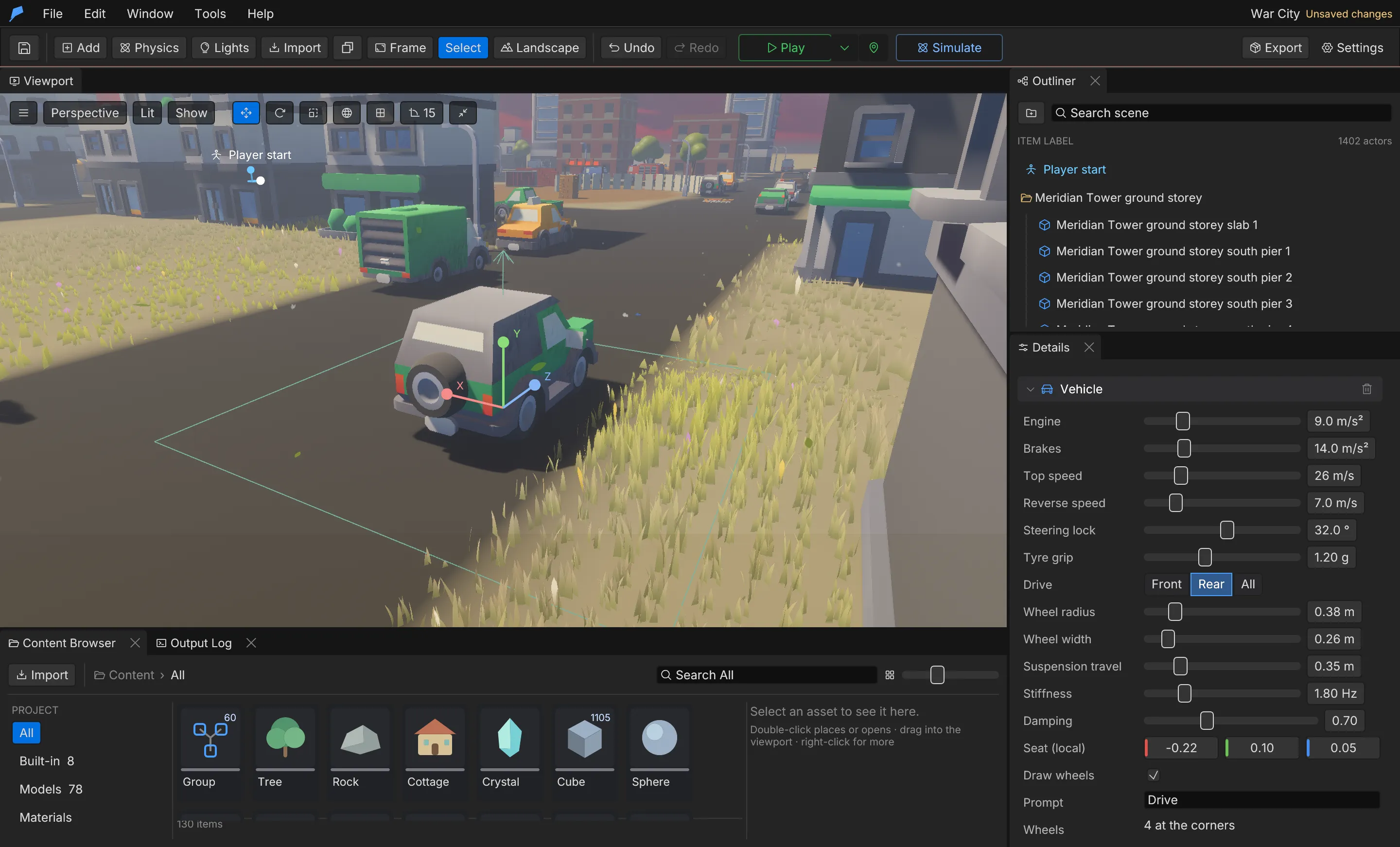
- Tune the engine, brakes, tyres and suspension in Details → Vehicle.
- Press Play, walk to the driver’s side and press E.
| Control | Action |
|---|---|
| W / S | Throttle, brake and reverse |
| A / D | Steer |
| Jump | Handbrake |
| Interact | Get out |
Vehicle settings
Section titled “Vehicle settings”| Setting | Field | Range | Default |
|---|---|---|---|
| Engine | engine |
Pull at full throttle, 0–40 m/s² | 9 m/s² |
| Brakes | brake |
Deceleration at full brake, 0–60 m/s² | 14 m/s² |
| Top speed | max_speed |
1–120 m/s | 26 m/s |
| Reverse speed | reverse_speed |
0–40 m/s | 7 m/s |
| Steering lock | steer |
Front-wheel angle, reduced at speed, 0–60° | 32° |
| Tyre grip | grip |
g held before sliding, 0.1–3 | 1.2 g |
| Drive | drive |
Front, Rear or All |
Rear |
| Wheel radius | wheel_radius |
0.05–2 m | 0.38 m |
| Wheel width | wheel_width |
0.02–2 m | 0.26 m |
| Suspension travel | suspension |
0.05–1.5 m | 0.35 m |
| Stiffness | stiffness |
Bounce frequency, 0.5–6 Hz; low is soft | 1.8 Hz |
| Damping | damping |
Damping ratio, 0–2; 1 settles without bouncing | 0.7 |
| Seat | seat |
Driver position in local box space | [−0.22, 0.1, 0.05] |
| Draw wheels | show_wheels |
On/off | On |
| Prompt | prompt |
1–80 characters | Drive |
| Wheels | wheels |
Up to 16 mounts in local box space (−0.5 to 0.5 before scale) | Four bottom corners |
Each wheel casts a ray down from its mount. The suspension holds the body up, and the tyre pushes along the ground (engine and brakes) and sideways against sliding (grip). Both forces are limited by the load on that wheel, so heavy braking in a turn slides. Stiffness is a natural frequency, so the same values suit light and heavy vehicles.
To set custom wheel positions, for a truck or a six-wheeler, patch vehicle.wheels with
scene.update. Reset in Details → Vehicle returns to the four corners.
While you drive, the camera becomes a chase camera behind the vehicle. Its distance follows the vehicle’s longest side, so bigger vehicles get a wider view; there is nothing to set up.
Example: a rally car at the start
Section titled “Example: a rally car at the start”You’ll put an all-wheel-drive rally car next to the player start, get in and drive it. Start from the War City example project; the player starts at the FOB.
- Point the viewport at open ground just in front of the player start (the blue ring), then choose Physics → Car in the toolbar. You get a red Car with a Car cabin welded on top, at the centre of the view.
- Select Car. In Details, rename it Rally car.
- In Details → Vehicle, set Drive to All, Engine to 14 m/s², Tyre grip to 1.6 g and Top speed to 30 m/s.
- Press Play, walk to the car’s left side (the driver’s door) and press E when the Drive prompt appears.
- Hold W to accelerate, steer with A and D, and press E again to get out.
Do the same from the command line
Section titled “Do the same from the command line”physics.spawn returns the new IDs with the car first (1403 in a fresh copy of War City). The
position is terrain-relative, 6 m from the player start.
feather-cli --workspace /tmp/demo --project project.feather.json command physics.spawn \  --json '{"template":"car","position":[26,0,-34]}' --save project.feather.json
feather-cli --workspace /tmp/demo --project project.feather.json command scene.update \  --json '{"id":1403,"patch":{"name":"Rally car","vehicle":{"drive":"All","engine":14,"grip":1.6,"max_speed":30}}}' \  --save project.feather.json
Check it worked
Section titled “Check it worked”In Play, the view swings behind the car as soon as you get in, and the car pulls away when you hold W. Headless, walk back to the car (it is behind the player start), press E, then hold W:
feather-cli --workspace /tmp/demo --project project.feather.json command game.simulate --json '{ "frames": 200, "inputs": [ {"frame": 10, "key": "S", "pressed": true}, {"frame": 60, "key": "S", "pressed": false}, {"frame": 70, "key": "E", "pressed": true}, {"frame": 72, "key": "E", "pressed": false}, {"frame": 90, "key": "W", "pressed": true} ]}'The report’s vehicle section shows entered: [1403] and driver: 1403, seconds_driving
around 2.2 and distance around 17 m. controls["1403"] shows throttle: 1, grounded: 4 (all
four wheels on the ground) and a speed around 16.7 m/s.
Common problems
Section titled “Common problems”- No Drive prompt. The vehicle needs a Dynamic body. Stand by the seat, on the car’s −X side: within half the car’s width plus 1.8 m (at least 2.5 m), and within 2.5 m of its height.
- The car drives backwards. The front is the object’s local −Z. Rotate the object 180° around Y.
- The car tips over in corners. Lower its balance point: in Details → Physics → Advanced, turn on Own balance point and lower Centre of mass m. See Physics.
Add a boat
Section titled “Add a boat”- Choose Physics → Ship in the toolbar, or give a hull a Dynamic body and choose Details → Add Component → Boat.
- Place it on water. The bow is local −Z.
- Set the helm position, where the player stands to steer, and tune the sail and rudder.
- Press Play, walk to the helm and press E.
| Control | Action |
|---|---|
| W / S | Raise and lower the sail, and row or drive |
| A / D | Rudder |
| Jump | Drop or raise the anchor |
| Interact | Leave the helm |
Boat settings
Section titled “Boat settings”| Setting | Field | Range | Default |
|---|---|---|---|
| Sail | sail |
Acceleration at full sail with a fresh wind behind, 0–20 m/s²; 0 has no sail | 1.6 m/s² |
| Oars / motor | thrust |
Acceleration at full throttle, 0–20 m/s² | 0.6 m/s² |
| Turn rate | turn_rate |
Rudder turn rate once moving, 0–180°/s | 22°/s |
| Top speed | max_speed |
0.5–60 m/s | 9 m/s |
| Keel | keel |
Resistance to sideways sliding, 0–10 | 4 |
| Helm | helm |
Captain position in local box space | [0, 0.5, 0.35] |
| Prompt | prompt |
1–80 characters | Take the helm |
Sails pull hardest with the wind behind and a little even against it. Set the wind in Physics → World; see Physics. A boat floats when its body is lighter than the water it displaces; water density and waves are covered in Water and fluids. A boat left under sail keeps going, and an anchored boat stays moored after the captain leaves. A boat that rolls too easily steadies with a lower balance point (Own balance point under Details → Physics → Advanced).
Extend it
Section titled “Extend it”| Function | Description |
|---|---|
drive(id) |
Puts the player in a vehicle |
leave_vehicle() |
Gets the player out |
driving() |
The ID of the vehicle the player is driving, or 0 |
vehicle_input(id, throttle, steer, handbrake) |
Drives a vehicle without a player; throttle and steer are −1 to 1 |
vehicle_speed(id) |
The vehicle’s current speed |
board(id) |
Puts the player at a boat’s helm |
leave_boat() |
Leaves the helm |
helm() |
The ID of the boat the player is steering, or 0 |
set_sail(id, amount) |
Sets the sail, 0 furled to 1 full |
set_anchor(id, on) |
Drops or raises the anchor |
Scripted input stays in effect until you send new input, so you can set it once per decision rather than every frame.
// A world script: car 12 circles on its own until the player gets in.fn update(dt) { if driving() == 12 { return; } vehicle_input(12, 0.6, 0.3, false);}Limits
Section titled “Limits”- Vehicles and boats need a Dynamic body; the component does nothing on other body types.
- A vehicle has at most 16 wheels. Wheel mounts, the seat and the helm must be within ±10 in local units.
Automate it
Section titled “Automate it”# Add a car 10 m ahead of the originfeather-cli --connect .feather-session.json command physics.spawn \ --json '{"template":"car","position":[0,0,10]}'
# Make car 12 an all-wheel-drive rally car with softer suspensionfeather-cli --connect .feather-session.json command scene.update \ --json '{"id":12,"patch":{"vehicle":{"drive":"All","grip":1.6,"stiffness":1.4,"suspension":0.5}}}'
# Give ship 20 a bigger sailfeather-cli --connect .feather-session.json command scene.update \ --json '{"id":20,"patch":{"boat":{"sail":3,"max_speed":14}}}'game.simulate reports the driving and helm state, so agents can check handling without a
renderer. See Simulation.