Feather includes a complete first-person combat kit. Turning it on gives the player a movement
kit, a grapple, modular guns, melee weapons, grenades and a charged ability, and fills your levels
with enemies that have hitboxes, severable limbs and loot drops. Everything is stored in the
project as combat data, so you tune numbers rather than write systems, and you drive missions
from world scripts.
Combat also supports over-the-shoulder shooting when the project’s player camera is third-person with an avatar.
What’s included
Section titled “What’s included”- Player: health, regenerating armour, a hit grace period and a close-range shove.
- Movement kit: run, sprint, slide, dash, coyote-time jumps, field-of-view kick and head bob.
- Grapple: a rope to tagged anchors or any static surface, with reel, swing and release boost.
- Modular guns: weapons assembled from a Frame, Core, Barrel and Relic, plus a sidearm.
- Melee: light and heavy swings, cleaving, blocking, and tools that dig the ground.
- Grenades (blast and gravity) and a charged area ability.
- Enemies: melee, ranged and charger archetypes, hostile or allied, with hitboxes per bone, limbs that sever, weak points and drops.
- Pickups, feedback and HUD: ammo, health, armour, grenade and charge pickups; hit markers, gore, blood decals and camera shake; a compass, minimap and objective markers.
- Budgets that cap enemies, body parts, particles and projectiles in large fights.
Set up combat
Section titled “Set up combat”- Open Window → Combat.
- Select First-person combat enabled.
- Work through the tabs: Player & keys, Movement & grapple, Weapons, Grenades & ability, Melee & arms, Enemies, Feedback & budgets and HUD.
- Press Play. Enemies are spawned by world scripts (see Extend it).
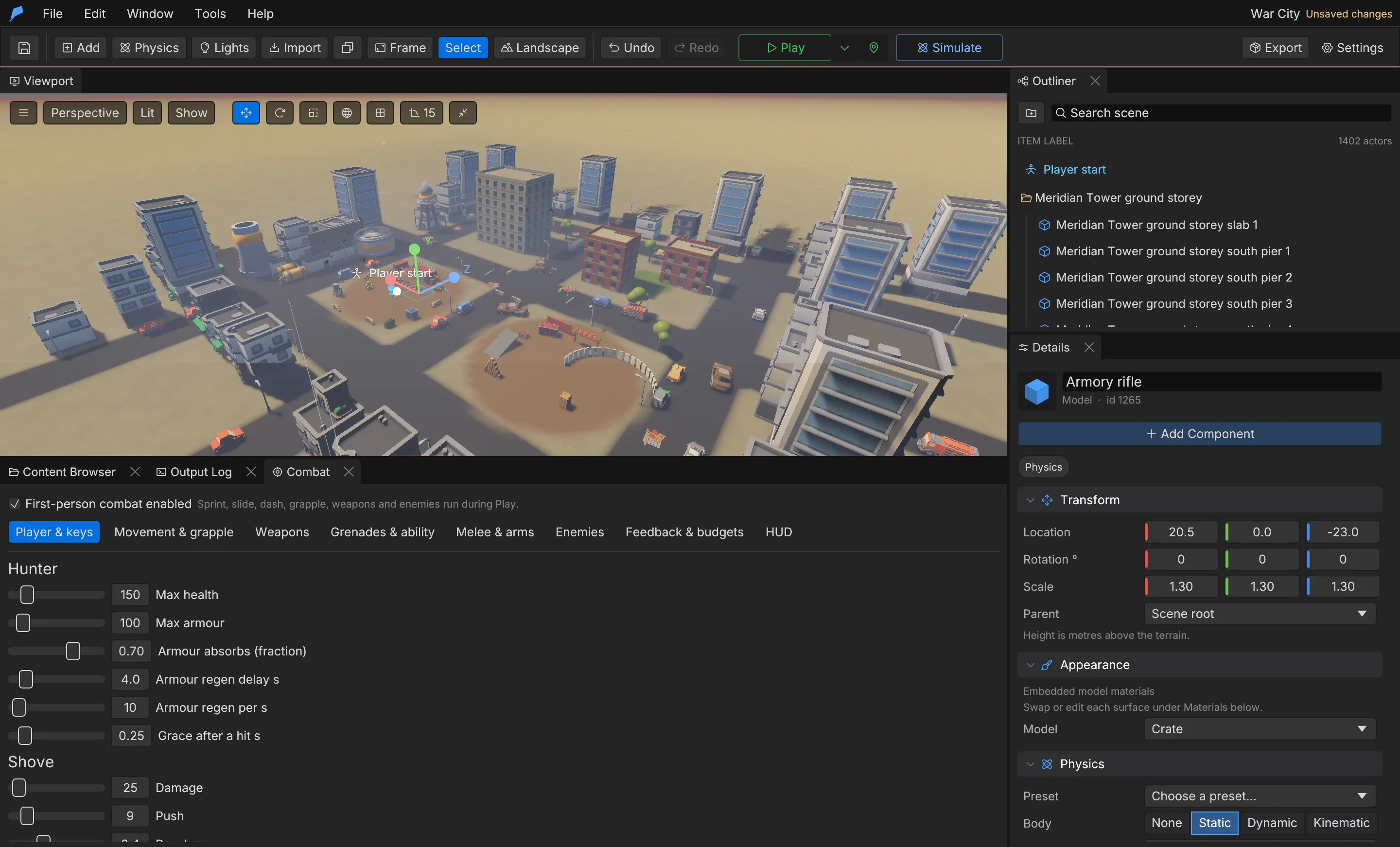
Every edit in the window commits through combat.set, the same validated, undoable path agents use.
New projects start with a working set: two frames (hex_shotgun, warden_rifle), two cores
(wraith_core, ember_core), two barrels (scatter_barrel, long_barrel), two relics
(chain_relic, storm_relic), the blast and gravity grenades, an axe, and the enemies
swarmer, hex_caster and armoured_revenant.
Player and keys
Section titled “Player and keys”| Field | Description | Default |
|---|---|---|
player.max_health |
Health | 100 |
player.max_armor |
Armour | 50 |
player.armor_absorb |
Fraction of damage armour absorbs | 0.7 |
player.armor_regen_delay |
Seconds without damage before armour regenerates | 4 s |
player.armor_regen_rate |
Armour regained per second | 10 |
player.hit_grace |
Invulnerability after a hit | 0.25 s |
player.melee_damage, melee_push, melee_range, melee_cooldown |
The shove | 25, 9, 2.4 m, 0.7 s |
| Action | Field | Default key |
|---|---|---|
| Fire / aim | keys.fire, keys.aim |
Mouse1 / Mouse2 |
| Sprint and dash | keys.sprint, keys.dash |
ShiftLeft |
| Slide | keys.slide |
ControlLeft |
| Jump | keys.jump |
Space |
| Grapple | keys.grapple |
F |
| Grenade | keys.grenade |
G |
| Ability | keys.ability |
Q |
| Reload | keys.reload |
R |
| Shove | keys.melee |
V |
| Melee, primary and sidearm slots | keys.melee_slot, ranged_slot, secondary_slot |
1, 2, 3 |
Movement and grapple
Section titled “Movement and grapple”| Field | Default |
|---|---|
run_speed / sprint_speed |
6.5 / 9.5 m/s |
acceleration |
60 m/s² |
air_control |
0.35 |
gravity |
22 m/s² |
jump_speed |
7.5 m/s |
coyote_time |
0.12 s after leaving a ledge |
slide_speed, slide_duration, slide_cooldown |
13 m/s, 0.75 s, 0.4 s |
slide_height |
Eye drop while sliding, 0.6 m |
dash_speed, dash_duration, dash_cooldown |
22 m/s, 0.16 s, 1.2 s |
fov / sprint_fov |
72° vertical / +8° while sprinting or dashing |
head_bob, slide_tilt |
0.035, 4° |
The grapple attaches to objects tagged grapple (anchors: "Tagged", the default) or to any static
surface ("AnySurface").
| Field | Description | Default |
|---|---|---|
grapple.enabled |
Grapple available | On |
range |
Reach | 32 m |
aim_cone |
Aim assist angle around the crosshair | 7° |
reel_speed, pull |
Reel-in speed and pull acceleration | 20, 45 |
swing_control |
Steering while attached | 14 |
release_distance |
Detaches this close to the anchor | 2.5 m |
max_attach_seconds |
Longest attachment | 2.5 s |
cooldown |
Between grapples | 1.5 s |
release_boost |
Upward boost on release | 4 |
Weapons
Section titled “Weapons”A gun is a loadout of four parts. The Frame sets the weapon family and its base stats; the Core, Barrel and Relic attach to the frame’s sockets and change stats with modifiers.
- In Weapons, create or select a part and choose its slot.
- For a frame, set the
family(for exampleshotgunorrifle), the base stats, and the sockets where other parts and the muzzle sit. - For other parts, list the families they fit in
fits(empty fits every frame) and add modifiers:{stat, op, value}withopset toAdd,MultiplyorSet. - Choose a model, offset, rotation and scale for each part, plus fire and reload sounds.
- Set the starting
loadout(and, optionally, asecondarysidearm on key 3).
Feather applies the frame’s base stats, then every part’s modifiers in slot order, and clamps the result to playable ranges.
| Stat | Description | Clamped to |
|---|---|---|
damage |
Per pellet or projectile | 0–10,000 |
pellets |
Pellets per shot | 1–32 |
spread |
Degrees | 0–45 |
fire_rate |
Shots per second | 0.1–30 |
magazine, reserve |
Rounds | 1–500, 0–5000 |
reload_time |
Seconds | 0.05–10 |
range, falloff |
Damage falls to half between falloff and range, metres | 1–500 |
impulse |
Push on hit | 0–200 |
recoil |
Camera kick per shot, degrees | 0–45 |
projectile_speed |
0 is hitscan; otherwise m/s | 0–500 |
homing |
Turn rate toward the nearest enemy, rad/s | 0–50 |
limb_multiplier, weakpoint_multiplier |
Extra damage to limbs and weak points | 0–20 |
stagger |
Stagger per hit | 0–20 |
charge_per_hit |
Ability charge per hit | 0–100 |
chain_bonus |
Damage bonus per chained kill, up to five stacks | 0–5 |
ability_radius |
Ability radius multiplier | 0.1–5 |
automatic |
1 holds to fire | 0 or 1 |
explosion_radius, explosion_damage |
Projectiles explode on impact (rockets, launchers) | 0–30 m, 0–10,000 |
Props tagged explosive chain-explode and props tagged breakable shatter when shot. Hitscan shots
into the ground flick the built-in grass aside and clip a tuft while the grass’s Shots clip it
setting is on (the default); see Foliage and biomes.
Example: a marksman barrel for the starting rifle
Section titled “Example: a marksman barrel for the starting rifle”You’ll add a barrel that makes the rifle hit harder and more accurately at long range but fire
more slowly, and put it on the player’s starting gun. Start from the War City example project,
whose starting gun is the rifle frame (named AK-47).
- Open Window → Combat · movement, weapons, enemies and select the Weapons tab.
- Under Parts, click + Barrel. Set Id to
marksman_barrel, Name to Marksman Barrel and Fits families (empty = all) torifle. - Under Modifiers, click + Modifier four times and set them to:
spread× 0.4range+ 40damage+ 8fire_rate× 0.6
- Under Default loadout, choose Marksman Barrel in the Barrel box. The line below reads Assembled: AK-47 with the new stats.
- Press Play. You start with the rifle and its new barrel. Taking a gun from War City’s weapon
crates swaps it for that bare frame, because the example’s world script calls
set_loadout(frame, "", "", "").
Do the same from the command line
Section titled “Do the same from the command line”feather-cli --workspace /tmp/demo --project project.feather.json command combat.upsert \ --json '{"kind":"weapon_part","value":{"id":"marksman_barrel","name":"Marksman Barrel","slot":"Barrel","fits":["rifle"],"modifiers":[{"stat":"spread","op":"Multiply","value":0.4},{"stat":"range","op":"Add","value":40},{"stat":"damage","op":"Add","value":8},{"stat":"fire_rate","op":"Multiply","value":0.6}]}}' \ --save project.feather.json
feather-cli --workspace /tmp/demo --project project.feather.json command combat.set \ --json '{"patch":{"loadout":{"frame":"rifle","barrel":"marksman_barrel"}}}' \ --save project.feather.jsonCheck it worked
Section titled “Check it worked”Read the assembled weapon back:
feather-cli --workspace /tmp/demo --project project.feather.json command combat.get --json '{}'loadout.barrel is marksman_barrel, and assembled_default_weapon.stats shows damage 30
(was 22), spread 0.48 (was 1.2), range 160 (was 120) and fire_rate 5.4 (was 9).
Combat doesn’t run in game.simulate, so check the feel in Play: shots group tighter and the rifle
fires noticeably slower.
Common problems
Section titled “Common problems”- “Marksman Barrel does not fit the shotgun frame.” The part’s Fits families doesn’t include the frame’s Family. Add the family, or leave the list empty to fit every frame.
- “marksman_barrel is not a frame.” Only a Frame part can go in the frame slot.
- A part can’t be deleted. Delete part is disabled while the default loadout uses it.
A melee weapon takes the melee slot. Tap fire for a light swing, hold it for a heavy swing, and hold aim to block.
| Field | Description | Axe default |
|---|---|---|
light_damage, heavy_damage |
Damage per swing | 42, 110 |
light_seconds, heavy_seconds |
Swing duration | 0.55 s, 0.85 s |
heavy_charge |
Hold time for a heavy swing | 0.35 s |
hit_window |
Part of the swing that can hit, 0–1 | [0.25, 0.6] |
range, arc |
Reach and swing width | 2.7 m, 110° |
cleave_light, cleave_heavy |
Enemies one swing cuts through | 2, 4 |
limb_multiplier |
Blades sever limbs readily | 1.8 |
block_reduction, block_angle |
Damage blocked and the arc it covers | 0.8, 120° |
dig_radius, dig_depth |
Earth moved per ground hit when destruction is on | 0 m, 0 m |
structure_damage |
Multiplier against destructible objects | 1 |
destruction.setup adds an entrenching shovel that digs foxholes and trenches. See
Destruction.
The Melee & arms tab also configures the first-person arms model, its weapon sockets and animation clips, and an optional carried lantern.
Grenades and ability
Section titled “Grenades and ability”| Field | Description | Blast default |
|---|---|---|
kind |
Blast, or Gravity (pulls light enemies in, then bursts) |
Blast |
fuse |
Seconds | 1.4 s |
radius, damage, impulse, stagger |
Blast | 6 m, 140, 14, 3 |
pull, pull_duration |
Gravity grenades only | 0 |
throw_speed |
m/s | 19 |
self_damage |
Fraction the player takes from their own blast | 0.3 |
The player starts with grenade_stock grenades (default 3) and carries up to grenade_max
(default 4).
The ability (default name Shockwave) fills from hits and kills and releases an area blast:
charge 100, charge_per_kill 8, radius 9 m, damage 60, impulse 18, stagger 4.
Enemies
Section titled “Enemies”Each enemy archetype combines a model, a behaviour, combat numbers, hitboxes, limbs and drops.
| Field | Description |
|---|---|
behaviour |
Melee runs in and strikes; Ranged keeps distance and casts telegraphed projectiles; Charger adds a readable charge at mid range |
team |
Hostile hunts the player and allies; Ally fights hostiles beside the player and follows them when no hostile is near. The player’s shots pass allies by |
health, armor |
Armour is the fraction of damage ignored, except on weak points |
heavy |
Resists gravity pulls and most knockback |
walk_speed, run_speed, radius, height |
Movement and body size |
attack_*, ranged_*, charge_* |
Damage, range, wind-up and cooldown per attack type; wind-ups telegraph the strike so it can be dodged |
flank |
0 comes straight in, 1 swings wide so crowds surround |
leap_range, leap_speed, leap_cooldown |
Pounce from a distance band; [0, 0] never leaps |
vault_speed |
Hop over low obstacles when stuck; 0 never |
poise |
Stagger needed to interrupt |
gib_overkill |
Overkill damage that blows the body apart |
model_variants |
Other looks on the same skeleton; each spawn picks one |
clips |
Idle, walk, run, attack, hit, death and other clips, with variants |
value |
A number scripts read in on_enemy_killed |
Hitboxes and limbs
Section titled “Hitboxes and limbs”A hitbox is a capsule from bone to to_bone (or length metres along the bone) with a radius,
and it feeds damage to a limb. Default archetypes use a humanoid rig.
| Limb field | Description |
|---|---|
id |
Limb name, referenced by hitboxes |
sever_bone |
Bone whose subtree comes off when the limb is destroyed; empty never severs |
health |
Limb health as a fraction of the enemy’s health |
damage_multiplier |
Damage multiplier for hits on this limb |
effect |
None, DisableAttack, DisableRanged, Limp, Crawl or Kill |
lethality |
Fraction of a limb hit that also reaches the enemy’s health |
weakpoint |
Applies the weapon’s weak-point multiplier and ignores armour |
Low lethality on arms and legs means shooting a limb cripples an enemy rather than killing it.
drops is a list of {kind, chance, amount} where kind is Ammo, Health, Armor, Grenade
or Charge. By default an enemy drops ammo 20% of the time and health 8% of the time. Pickups are
pulled toward the player within pickups.magnet_radius (default 3.5 m) and vanish after
pickups.lifetime (default 25 s).
To give an enemy authored behaviour, assign it a behaviour tree. See AI and navigation.
Feedback, budgets and HUD
Section titled “Feedback, budgets and HUD”| Field | Default |
|---|---|
feedback.shake |
1 (players can scale it down in Settings) |
feedback.hit_markers, damage_vignette, gore |
On |
feedback.head_burst |
On: a killing shot to a severable head bursts it |
feedback.blood_decals, max_decals, decal_seconds |
On, 160, 45 s |
feedback.bleed_seconds |
1.8 s |
feedback.flinch |
14° per hit |
budgets.max_enemies |
60 |
budgets.max_body_parts |
28 |
budgets.max_particles |
700 |
budgets.max_projectiles |
120 |
budgets.corpse_seconds, part_seconds |
6 s, 8 s |
hud.compass, hud.minimap, hud.world_markers |
On |
hud.minimap_range |
45 m |
hud_template replaces the built-in HUD with your own markup. It can use {{health}},
{{max_health}}, {{health_pct}}, {{armor}}, {{armor_pct}}, {{ammo}}, {{reserve}},
{{weapon}}, {{grenade}}, {{grenades}}, {{ability_pct}}, {{ability_ready}},
{{grapple_ready}}, {{dash_ready}} and {{reloading}}. Leave it empty to use the built-in HUD.
Damage kinds and statuses
Section titled “Damage kinds and statuses”All damage goes through one shared path, elements. It has seven damage kinds — physical,
blunt, explosive, fire, electric, ice and water — and four statuses: burning, wet,
shocked and chilled. Wet targets take half fire damage and double electric damage; chilled
targets move slower and take more from blunt hits. Per-material and per-enemy multipliers (0 makes
a target immune) are set with elements.set.
Extend it
Section titled “Extend it”World scripts drive missions with these functions. Enemy IDs are strings.
| Function | Description |
|---|---|
spawn_enemy(kind, x, y, z[, yaw]) |
Spawns an archetype; returns its ID |
set_horde(on) |
Enemies spawned from now on sprint |
enemies(), enemy_count([kind]) |
Live enemies as maps {id, kind, x, y, z, health}, or a count |
damage_enemy(id, amount), kill_enemies(), clear_enemies() |
Damage or remove enemies |
player_health(), player_max_health(), player_armor(), player_alive() |
Player state |
heal_player(n), hurt_player(n), set_player_health(n), give_armor(n) |
Change health and armour |
ammo(), reserve_ammo(), give_ammo(n) |
Ammunition |
grenades(), grenade_type(), give_grenades(n), set_grenade(id) |
Grenades |
ability_charge(), add_charge(n) |
The ability |
loadout(), set_loadout(frame, core, barrel, relic), weapon_name() |
The equipped gun |
spawn_pickup(kind, amount, x, y, z) |
Drops a pickup |
set_marker(key, x, y, z, label), clear_marker(key) |
Objective markers on the compass, minimap and screen |
revive_player(), refill_player(), set_invulnerable(on), set_combat_controls(on) |
Player control |
kills(), combat_running() |
Run state |
deal_damage(target, amount, kind), damage_area(x, y, z, radius, amount, kind) |
Damage through elements |
apply_status(target, status, seconds), clear_status, has_status, statuses |
Statuses |
profile_get(key[, default]), profile_set(key, value), profile_has(key) |
Unlocks and banked values that persist across runs |
| Hook | Runs when |
|---|---|
on_enemy_killed(id, kind, x, y, z, value) |
An enemy dies |
on_player_hurt(amount) |
The player takes damage |
on_player_died() |
The player dies |
on_pickup(kind, amount) |
The player collects a pickup |
on_damaged(target, amount, kind) |
The player, an enemy or an object takes damage through elements |
on_status(target, status) |
A target starts burning, gets wet, shocked or chilled |
// A simple wave: spawn five swarmers, then a reward when they are all down.fn start() {    for i in 0..5 {        spawn_enemy("swarmer", i * 2.0, 0.0, 30.0);    }    set_marker("arena", 0.0, 0.0, 30.0, "Arena");}
fn on_enemy_killed(id, kind, x, y, z, value) {    if enemy_count() == 0 {        clear_marker("arena");        spawn_pickup("health", 25, x, y, z);    }}
See Scripting for where world scripts live.
Limits
Section titled “Limits”- Up to 64 entries each for weapon parts, grenades, enemies and melee weapons; IDs are at most 48 characters.
- A loadout must use a Frame in the frame slot, and other parts must fit the frame’s family.
- Live enemies are capped by
budgets.max_enemies.
Automate it
Section titled “Automate it”# Turn combat on and make sprinting fasterfeather-cli --connect .feather-session.json command combat.set \ --json '{"patch":{"enabled":true,"movement":{"sprint_speed":11}}}'
# Add a barrel that trades spread for range on riflesfeather-cli --connect .feather-session.json command combat.upsert \ --json '{"kind":"weapon_part","value":{"id":"marksman_barrel","name":"Marksman Barrel","slot":"Barrel","fits":["rifle"],"modifiers":[{"stat":"spread","op":"Multiply","value":0.4},{"stat":"range","op":"Add","value":40}]}}'
# Make swarmers immune to firefeather-cli --connect .feather-session.json command elements.set \ --json '{"patch":{"enemies":{"swarmer":{"fire":0}}}}'combat.get with no arguments returns every section, the assembled default weapon and the stat
names; pass section, or kind and id, to read one part. combat.remove deletes a weapon part,
grenade, enemy or melee weapon.