Sky, weather and climate
The environment is project-wide. It covers the sky and the sun, the clock, clouds, the weather, the season, the climate that ties temperature to snow, ice and fire, and small ambient touches such as fireflies and birds. All of it previews live in the editor and runs the same way in an exported game.
Most settings live in Window → World & terrain, on the Environment, Weather and Ambience tabs.
Apply a lighting look
Section titled “Apply a lighting look”A lighting look sets the time of day, haze and volumetric sun shafts, bloom, ambient occlusion and colour grading in one undo step. Water and a painted sky are kept.
- Open Window → World & terrain → Environment.
- Click a look next to Lighting look.
- Fine-tune the individual settings below it.
| Look | Description |
|---|---|
| Clear day | Bright noon, crisp shadows and a light haze |
| Battlefield | Dusty warm daylight with sun shafts through the haze |
| Golden hour | Low orange sun, long shadows and glowing shafts |
| Overcast | Soft grey light and muted colours |
| Foggy dawn | Cold blue morning mist with soft shafts |
| Night battle | Moonlit night in smoky haze; explosions and lamps light the fog |
| Storybook | Warm, saturated and soft |
Looks with volumetric haze switch anti-aliasing to TAA so the shafts render smoothly.
Choose a sky
Section titled “Choose a sky”Set Sky on the Environment tab:
| Sky | Description |
|---|---|
| Classic | A stylised flat sky with linear fog. This is the default |
| Physical | A scattering atmosphere with HDR exposure and tonemapping |
Physical atmosphere
Section titled “Physical atmosphere”With Sky set to Physical, the Atmosphere (Physical sky) section shapes the sky through the day.
| Setting | Field | Range | Default |
|---|---|---|---|
| Air (blue sky, red sunsets) | air |
0–5 | 1 |
| Air tint | air_tint |
sRGB multiplier | White |
| Haze | haze |
0–20 | 1 |
| Glow around the sun | haze_glow |
0–0.99 | 0.8 |
| Ozone | ozone |
0–5 | 1 |
| Atmosphere height | height_km |
10–400 km | 100 |
| Sun size | sun_size |
0–10° | 0.53 |
| Sun brightness | sun_brightness |
0–20 | 1 |
| Distance haze | distance_haze |
0–50 | 8 |
| Stars at night | stars |
0–1 | 0.6 |
Distance haze fades far land into the air. Raise it to make a small world feel larger.
Sky library and skyboxes
Section titled “Sky library and skyboxes”A skybox is a painted 360° panorama drawn behind everything. It also lights the scene in its own colours and replaces the generated sky.
- In the Sky section, click a sky in the library gallery to use it.
- Adjust the fit:
| Setting | Field | Range | Default |
|---|---|---|---|
| Turn sky ° | rotation |
−180 to 180 | 0 |
| Horizon tilt ° | horizon |
−10 to 10 in the panel, −20 to 20 by command | 0 |
| Brightness | brightness |
0–3 in the panel, 0–4 by command | 1 |
| Lights the scene | lighting |
0–3 | 1 |
| Match fog, water and light colours | match_colors |
On/off | On |
- Click Use the generated sky to remove the skybox.
The library holds folders that each contain a 2:1 equirectangular PNG. Run
python3 scripts/fetch_skies.py in the engine repository to download free stylized skies into it,
then click Refresh library. Import your own panorama, folder or skybox .zip with sky.import.
When you set a skybox this way, a painted sun is turned to match the scene’s sun unless you pass
"align_sun": false.
Painted sky and night
Section titled “Painted sky and night”The Classic sky can use a Painted sky (gradient dome) with zenith and horizon colours, a
Moon disc, stars, wispy clouds and a sky drift speed. The moonlight follows the moon’s
direction and elevation. Tension colours the sky tints the dome by the game’s tension; scripts
call set_sky_mood(mood) with 0 (calm), 1 (tense) or 2 (peak).
The night settings control the moonlight colour and strength, the night sky colour, and the night fill light.
Set the time of day
Section titled “Set the time of day”| Setting | Field | Range | Default | Description |
|---|---|---|---|---|
| Time of day | time_of_day |
0–24 h | 13:00 | Play starts at this time |
| Day length (min) | day_length_minutes |
0–120 in the panel, 0–1,440 by command | 0 | Real minutes per in-game day during Play. 0 freezes the clock |
| Sunrise direction ° | sun_azimuth |
−180 to 180 in the panel, −360 to 360 by command | 120 | Compass direction of sunrise |
| Sky light | sky_light |
0–4 | 1 | How brightly the sky fills shadowed areas by day |
Scripts read and change the clock with hour(), minute(), time_of_day(), set_time(hour)
and set_day_length(minutes).
The same tab holds fog distance, bloom, ambient occlusion and exposure; see Post-processing. Sun shadows are covered in Lighting, and the water look in Water and fluids.
Volumetric clouds
Section titled “Volumetric clouds”Volumetric clouds are 3D clouds lit by the sun. They drift with the wind, shade the ground and show in the water. Turn on Volumetric clouds in the Clouds section.
| Setting | Field | Range | Default |
|---|---|---|---|
| Volumetric clouds | enabled |
On/off | Off |
| Coverage | coverage |
0 (clear) – 1 (overcast) | 0.5 |
| Density | density |
0–3 | 1.2 |
| Altitude | altitude |
50–4,000 m in the panel | 500 m |
| Thickness | thickness |
50–3,000 m in the panel | 800 m |
| Size | scale |
0.2–5 | 1 |
| Drift speed | speed |
0–5 | 1 |
| Shadows | shadows |
0–1 | 0.6 |
| Wispy edges | detail |
0–1 | 0.5 |
| Tint | color |
sRGB multiplier | White |
| Painterly light | stylized |
On/off | On |
Weather
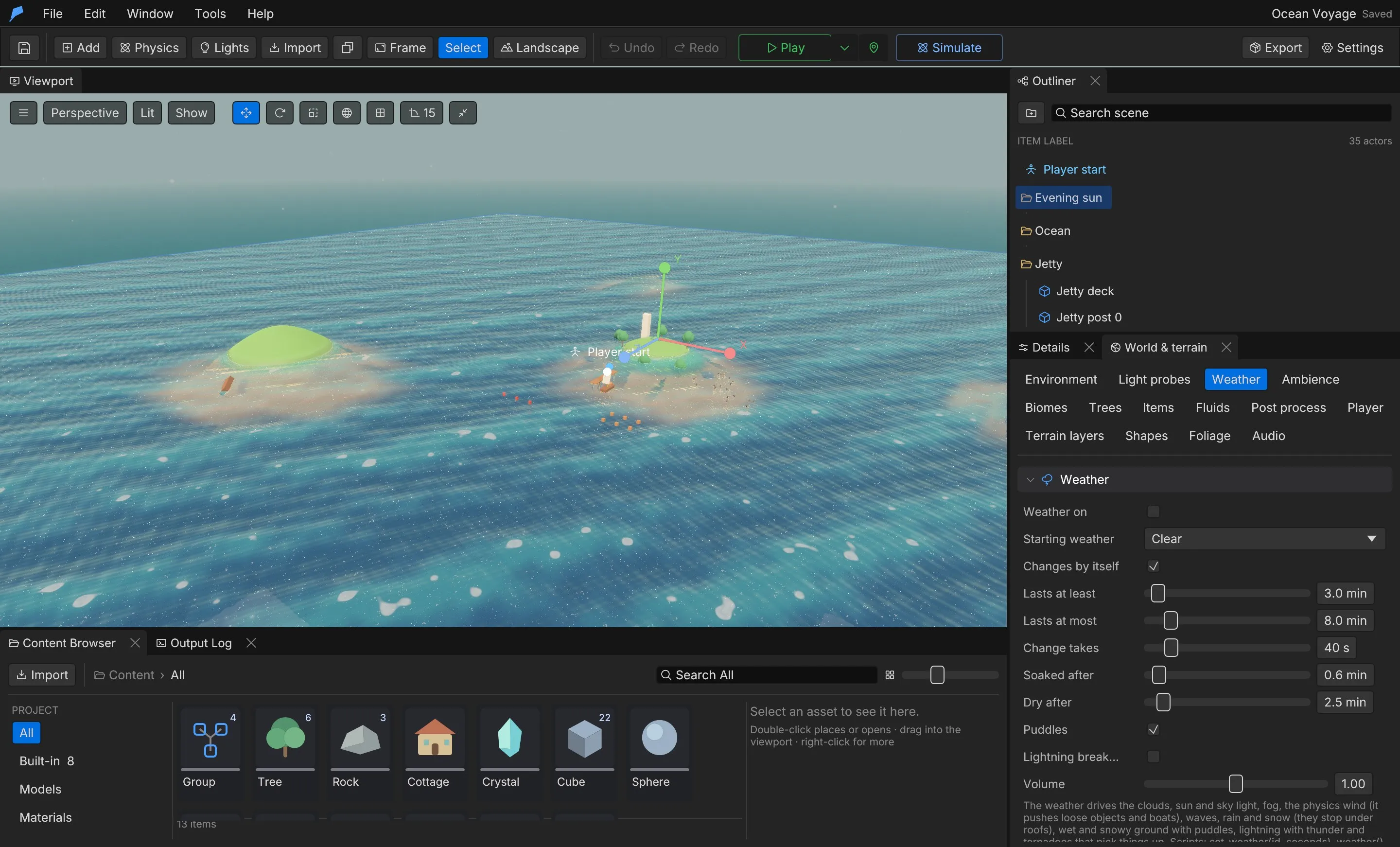
Section titled “Weather”When the weather is on, it drives the clouds, sun and sky light, fog, the physics wind that pushes loose objects and boats, waves, rain and snow, wet ground and puddles, lightning and tornadoes. Rain and snow stop under roofs.
- Open Window → World & terrain → Weather.
- Turn on Weather on and pick the starting weather.
- Turn on Changes by itself to follow the forecast, or leave it off to keep one weather.
- Under Forecast, set a weight for each weather. Higher weights come up more often.
- Under Weathers, tune a built-in weather or click New to add your own.
Built-in weathers: Clear, Cloudy, Overcast, Rain, Storm, Thunderstorm, Snow, Blizzard, Fog, Sandstorm and Tornado. The default forecast cycles between Clear, Cloudy, Overcast, Rain, Storm and Thunderstorm.
| Setting | Field | Range | Default |
|---|---|---|---|
| Weather on | enabled |
On/off | Off |
| Changes by itself | automatic |
On/off | On |
| Lasts at least / at most | duration_minutes |
0.1–60 min in the panel, 0.1–240 by command | 3–8 min |
| Change takes | transition_seconds |
0–300 s in the panel, 0–600 by command | 40 s |
| Soaked after | wetting_minutes |
0.05–10 min in the panel | 0.6 min |
| Dry after | drying_minutes |
0.05–30 min in the panel | 2.5 min |
| Puddles | puddles |
On/off | On |
| Lightning breaks things | lightning_damage |
On/off | Off |
| Volume | volume |
0–2 | 1 |
Weather settings
Section titled “Weather settings”| Setting | Field | Range |
|---|---|---|
| Cloud cover | clouds |
0–1 |
| Storm clouds | cloud_darkness |
0–1 |
| Wind | wind |
0–60 m/s |
| Gusts | gust |
0–1 |
| Rain | rain |
0–1 |
| Snow | snow |
0–1 |
| Fog | fog |
0–1, with a fog colour |
| Sunlight | light |
0–1 |
| Waves | waves |
0–3 |
| Wet ground | wetness |
0–1; puddles form above about 0.6 |
| Lightning | lightning |
0–30 strikes per minute |
| Tornado | tornado |
On/off |
You cannot delete the starting weather. The Sounds section replaces the built-in rain, heavy rain, wind, storm, tornado and near and far thunder sounds with project sounds.
During Play, scripts change the weather with set_weather(name, seconds) and read it with
weather(), wetness() and snow_cover(). lightning_strike(x, z), spawn_tornado(x, z) and
stop_tornado() trigger events directly.
Example: a stormy evening
Section titled “Example: a stormy evening”You’ll set a late-evening light, cover the sky in volumetric cloud and hold a thunderstorm over the level. Start from a new project (File → New project…); weather is off in new projects.
- Open Window → World & terrain and select the Environment tab.
- Next to Lighting look, click Golden hour. It sets the clock to about 18:18 and turns on volumetric haze.
- Drag the Time of day slider until its label reads Time of day 19:30.
- In the Clouds section, turn on Volumetric clouds and set Coverage to
0.9. - Select the Weather tab. Turn on Weather on, set Starting weather to Thunderstorm and turn off Changes by itself so the storm never clears.
- Press Play. Rain falls, the ground darkens with wetness, the wind picks up and lightning strikes at random.
Do the same from the command line:
feather-cli --workspace ./stormy-evening command project.create \  --json '{"name":"Stormy Evening"}' --save project.feather.json
feather-cli --workspace ./stormy-evening --project project.feather.json command environment.look \  --json '{"look":"golden_hour"}' --save project.feather.json
feather-cli --workspace ./stormy-evening --project project.feather.json command project.environment \  --json '{"time_of_day":19.5,"clouds":{"enabled":true,"coverage":0.9}}' --save project.feather.json
feather-cli --workspace ./stormy-evening --project project.feather.json command weather.set \  --json '{"patch":{"enabled":true,"current":"thunderstorm","automatic":false}}' \  --save project.feather.json
Check it worked by simulating four seconds with an extra lightning strike near the player start:
feather-cli --workspace ./stormy-evening --project project.feather.json command game.simulate \ --json '{"frames":240,"weather":[{"frame":60,"action":"strike","at":[5,-5]}]}'The report’s weather section shows "current": "thunderstorm", "rain": 1.0, "wind": 12.0 and
a strikes count of at least 1. weather.get confirms "enabled": true and "automatic": false.
Seasons
Section titled “Seasons”The season changes generated trees, falling leaves and grass. Broadleaf trees get fresh leaves and blossom in spring, look as designed in summer, turn orange, red and gold in autumn, and go bare in winter. Pines and palms stay green and are dusted with snow in winter.
- Open Window → World & terrain → Trees.
- Next to Season, pick Spring, Summer, Autumn or Winter. The default is Summer.
- To cycle during Play, turn on Changes by itself and set the in-game days per season (0.05–365, default 3).
Scripts use set_season(name) and season().
Climate
Section titled “Climate”The climate gives every place and moment a temperature and a moisture, so the systems that care about cold, heat and damp agree with each other. Temperature starts from a base, shifts with the biome, cools with altitude, swings with the season and time of day, and drops in rain. Moisture comes from the biome and the rain.
From that:
- Rain falls as snow below Snow below, and snow settles.
- Simulated water freezes to ice below Water freezes below and thaws again above it.
- Fire runs faster through hot, dry ground and stalls in cold, damp ground.
- Fireflies need at least about 6 °C and are at full strength from 14 °C. Butterflies need about 9 °C and are at full strength from 17 °C.
Open Window → World & terrain → Weather and expand Climate.
| Setting | Field | Range | Default |
|---|---|---|---|
| Climate on | enabled |
On/off | On |
| Base temperature | base |
−30 to 40 °C | 16 °C |
| Biome spread | biome_span |
0–40 °C | 18 °C |
| Colder with height | lapse |
0–5 °C per 100 m | 0.65 |
| Season swing | season_swing |
0–30 °C | 9 °C |
| Night chill | day_night |
0–25 °C | 7 °C |
| Rain cools by | rain_cooling |
0–15 °C | 4 °C |
| Snow below | snow_below |
−10 to 10 °C | 0.5 °C |
| Water freezes below | freeze_below |
−40 to 5 °C | −3 °C |
| Cold rain becomes snow | cold_snow |
On/off | On |
| Water freezes | freezing |
On/off | On |
| Heat and drought feed fire | fire_dryness |
On/off | On |
The base temperature applies to a middling biome at sea level, in spring, at mid-afternoon in clear weather. The day is warmest at 15:00 and coldest at 03:00. Water freezes below cannot be more than 5 °C above Snow below.
Scripts and Blueprints read the climate with temperature() (at the camera),
temperature_at(x, z) and moisture().
Snow and sand
Section titled “Snow and sand”Lying snow and loose sand form a field around the camera during Play that feet, bodies and blasts push about. The player, enemies, NPCs and moving bodies press trenches with berms beside them, blasts throw the snow or sand clear, and steep walls slump back. Falling snow fills tracks back in, and the wind smooths sand. Deep fresh snow or sand slows the player; a trodden track much less.
Snow lies only while the weather has a snow cover, as deep as Snow depth under a full cover. It settles on open, gentle ground, not under roofs, on cliffs or in rivers. Sand lies on one texture layer, or on all ground with Sand everywhere.
Open Window → World & terrain → Weather and expand Snow & sand.
| Setting | Field | Range | Default |
|---|---|---|---|
| Snow and sand on | enabled |
On/off | On |
| Detail | cell_size |
0.1–0.5 m per cell; smaller shows finer footprints | 0.25 m |
| Cells across | cells |
64–256 | 160 |
| Snow depth | snow_depth |
0–1.5 m | 0.35 m |
| Snowfall refills tracks in | snow_refill |
5–3,600 s | 240 s |
| Snow colour | snow_color |
sRGB | Near white |
| Sand | sand |
On/off | Off |
| Sand everywhere | sand_everywhere |
On/off | Off |
| Sand texture layer | sand_layer |
0 (base layer) – 3 | 0 |
| Sand depth | sand_depth |
0–0.6 m | 0.12 m |
| Wind ripples | ripples |
0–1 | 0.5 |
| Wind smooths sand in | sand_refill |
5–3,600 s | 600 s |
| Sand colour | sand_color |
sRGB | Pale tan |
| Slows walkers | slow |
0–0.9 | 0.45 |
Cells across × Detail is how far the field reaches; the default covers 40 m.
| Function | Description |
|---|---|
drift_depth_at(x, z) |
Metres of lying snow or sand there; 0 outside the field |
drift_carve(x, z, radius) |
Throws snow or sand out of a disc into a heap around it |
drift_pile(x, z, radius, height) |
Heaps snow or sand up, height metres in the middle; a negative height scoops it out |
Ambience
Section titled “Ambience”Ambience adds small living details that react to the wind, weather and time of day. It is on by default. Open Window → World & terrain → Ambience. Amounts run from 0 (off) through 1 (normal) to 2 (double).
| Setting | Description |
|---|---|
| Wind trails | Bright streaks that fly with the wind over the land, sometimes curling a loop. Need wind |
| Leaves | Leaves blown on the wind, more in gusts. Kind: Leaves, Autumn, Petals or Blossoms |
| Dust motes | Drift in daylight |
| Fireflies | Blink at dusk and at night |
| Butterflies | Come out on calm, dry days |
| Bird flocks | 0–8 flocks circling overhead |
| Birds land nearby | One flock lands near the player and takes off when the player comes within Birds take off at (1–40 m) |
Rain, snow, night and strong wind thin or hide each kind. Winter removes butterflies and thins fireflies. Underground, leaves, wind trails and butterflies disappear.
The built-in grass is configured on the same tab; see Foliage and biomes.
Scripts use set_ambience(feature, amount) until Play stops, and scatter_birds().
Limits
Section titled “Limits”- Time of day is 0 to just under 24 hours; day length is at most 1,440 real minutes.
- A forecast holds up to 64 entries. Weather names are 1–64 characters.
- Volumetric clouds are unavailable on the Low graphics setting.
Automate it
Section titled “Automate it”This applies the golden hour look, switches to the physical sky with a 20-minute day, and starts a rainy forecast:
feather-cli --connect .feather-session.json command environment.look \  --json '{"look":"golden_hour"}'
feather-cli --connect .feather-session.json command project.environment \  --json '{"sky":"Physical","day_length_minutes":20,"clouds":{"enabled":true,"coverage":0.6}}'
feather-cli --connect .feather-session.json command weather.set \  --json '{"patch":{"enabled":true,"current":"rain","automatic":true,"forecast":[{"weather":"rain","weight":3},{"weather":"storm","weight":1}]}}'
For a desert, turn on sand everywhere:
feather-cli --connect .feather-session.json command drifts.set \ --json '{"patch":{"sand":true,"sand_everywhere":true,"sand_depth":0.2}}'| Command | Purpose |
|---|---|
environment.look |
Applies a lighting look |
project.environment |
Patches the sky, clock, atmosphere, clouds, painted sky, night and skybox |
sky.library / sky.use / sky.import |
Lists library skies, uses one, or imports a panorama |
weather.get / weather.set |
Reads and patches the weather settings |
weather.upsert / weather.remove |
Creates, edits or deletes a weather |
season.get / season.set |
Reads and patches the season |
climate.get / climate.set |
Reads and patches the climate |
drifts.get / drifts.set |
Reads and patches the snow and sand settings |
ambience.get / ambience.set |
Reads and patches the ambience |
See Agents & automation for connecting a live session.