Water and fluids
Feather Engine 2 has two kinds of liquid. Water volumes are boxes of water, or an endless ocean, with a rendered surface, buoyancy, currents and waves; the player swims in them. Fluids are simulated liquids such as water, slime, lava, oil and mud that flow over the terrain, pool in dips, soak away and leave marks. Both share one underwater look when the camera goes below the surface.
Add a water volume
Section titled “Add a water volume”- Place an object where the water should be, for example a cube.
- In the Details panel, click Add Component → Water volume.
- Set Half size m. The top face of the box is the water surface.
- Pick a Wave strength preset, and set the current, density and drag.
- Turn on Endless ocean for a sea that reaches the horizon.
| Field | Range | Default | Description |
|---|---|---|---|
| Wave strength | 0–3. Presets: Calm 0, Gentle 0.5, Project 1, Rough 2, Storm 3 | 1 | Share of the project’s rolling waves this water gets. Floating bodies ride the same waves |
| Half size m | — | 10 × 2 × 10 | Half extents in the object’s local metres |
| Density | 100–3,000 kg/m³ in the panel | 1,000 | Bodies lighter than this float. Fresh water is 1,000, sea 1,025, mud about 1,600 |
| Drag | 0–10 | 1 | Linear drag in the water |
| Spin drag | 0–10 | 1 | Rotational drag |
| Current m/s | Vector | 0, 0, 0 | Flow along the object’s local axes; a river flows along it |
| Waves | 0–1 m in the panel | 0.12 | Height of the bobbing waves |
| Wave drift | 0–3 | 1 | How strongly the swell sways and carries floating things downwind |
| Draw surface | On/off | On | Draws the surface with the project’s water look |
| Endless ocean | On/off | Off | The surface reaches the horizon and follows the camera. Only the height of the box counts, as depth |
| Follows the weather | On/off | On | Storms whip the water up and rain draws rings. Turn it off for indoor pools and sheltered ponds |
| Player swims | On/off | On |
Floating objects need a Dynamic physics body. To sail or drive on the water, see Vehicles and boats.
Example: a crate that floats and a stone that sinks
Section titled “Example: a crate that floats and a stone that sinks”You’ll drop two boxes of the same size into the sea, one light and one heavy, and watch buoyancy
sort them. Start from the Ocean Voyage example (File → Open example → Ocean Voyage). Its
Ocean Group carries a water volume whose surface is at world height 0, and the seabed off the
jetty is at −14 m.
- Choose Add → Cube and name it
Test crate. In Details → Transform, set Location to-6,16,62(16 m above the seabed, so 2 m above the water, beside the jetty) and Scale to0.8,0.8,0.8. - In Details → Physics, set Body to Dynamic and Mass to
40kg. - Press Cmd/Ctrl+D to duplicate it. Name the copy
Test stone, set its Location to-10,16,62and its Mass to1500kg. - Press Play and look towards the jetty. The crate splashes in and bobs on the swell; the stone sinks to the seabed.
Both boxes are 0.512 m³. The crate’s density is about 78 kg/m³, well under the sea’s 1,025 kg/m³, so it floats. The stone’s is about 2,930 kg/m³, so it sinks.
Do the same from the command line, on a copy of the example. Ocean Voyage has 35 objects, so the new cubes get IDs 36 and 37:
mkdir -p ./ocean && cp featherv2/examples/ocean-voyage/project.feather.json ./ocean/
feather-cli --workspace ./ocean --project project.feather.json command scene.add \  --json '{"kind":"Cube","name":"Test crate","position":[-6,16,62]}' --save project.feather.jsonfeather-cli --workspace ./ocean --project project.feather.json command scene.add \  --json '{"kind":"Cube","name":"Test stone","position":[-10,16,62]}' --save project.feather.json
feather-cli --workspace ./ocean --project project.feather.json command scene.update \  --json '{"id":36,"patch":{"scale":[0.8,0.8,0.8],"physics":{"body":"Dynamic","mass":40}}}' \  --save project.feather.jsonfeather-cli --workspace ./ocean --project project.feather.json command scene.update \  --json '{"id":37,"patch":{"scale":[0.8,0.8,0.8],"physics":{"body":"Dynamic","mass":1500}}}' \  --save project.feather.json
Check it worked by simulating six seconds:
feather-cli --workspace ./ocean --project project.feather.json command game.simulate \ --json '{"frames":360}'In the report, Test crate ends with a final.position height of about 0.5, riding the waves at
the surface. Test stone ends around −10 and is still going down. error_count is 0.
Style the water
Section titled “Style the water”The water look is project-wide. Open Window → World & terrain → Environment and expand Water, or click Colours, foam, caustics… in a water volume’s Details section.
Pick a Style to start from: Tropical, Lake, Retro, Fantasy, Swamp or Arctic. Then adjust the settings.
| Setting | Field | Range | Default |
|---|---|---|---|
| Shallow / deep colour | shallow_color, deep_color |
sRGB | Turquoise / blue |
| Clarity | clarity |
0.2–20 m in the panel, up to 50 by command | 2.2 m |
| Opacity | opacity |
0–1 | 0.82 |
| Foam, Foam width, Foam colour | foam, foam_width, foam_color |
0–1; 0.05–3 m | 0.8; 0.35 m |
| Caustics, Caustic size | caustics, caustics_scale |
0–3; 0.2–5 | 0.9; 1 |
| Sparkle | sparkle |
0–2 | 0.8 |
| Cell lines | cell_lines |
0–1 | 0 |
| Wave height | wave_height |
0–2 m in the panel | 0.18 m |
| Wave length | wave_length |
1–40 m in the panel | 9 m |
| Whitecaps | whitecaps |
0–1 | 0.5 |
| Choppiness | choppiness |
0 (round swells) – 1 (sharp, breaking peaks) | 0.6 |
| Foam lingers | foam_persistence |
0–1 | 0.6 |
| Reflections | reflections |
0–1 | 0.8 |
| Refraction | refraction |
0–1 | 0.5 |
| Crest glow | crest_glow |
0–2 | 0.8 |
| Wakes | wakes |
0–2 | 1 |
| Spray | spray |
0–2 | 1 |
| Wet shore | shore_wetness |
0–2 | 1 |
Clarity is the depth before the water reaches the deep colour. Wave height is the rolling wave height at a moderate wind; storms raise it. Wakes draws foam trails behind boats, swimmers and moving floating objects, and Spray adds splashes and bow spray. Wet shore is how much darker the ground gets where waves wash over it, and how fast it dries as they pull back. On the Low graphics setting, reflections show only the sky.
Interactive surface
Section titled “Interactive surface”The water around the camera runs a live surface simulation. The player, floating bodies, boats and scripts stir currents that curl into eddies, stream foam along rivers and around rocks, and send ripples that bounce off the shore. Floating things drift with the swirls, and the water surface draws the currents, foam and ripples. With the simulation off, only the drawn rings and wakes remain.
The settings are under Interactive surface in the same Water section. It is on by default.
| Setting | Field | Range | Default |
|---|---|---|---|
| Simulate the surface | enabled |
On/off | On |
| Area | area |
8–200 m | 48 m |
| Solve on the GPU | gpu |
On/off | On |
| Cells | resolution |
32–256, or up to 512 on the GPU | 128 |
| Stir | stir |
0–3 | 1 |
| Swirl | swirl |
0–3 | 1 |
| Currents last | flow_seconds |
0.2–30 s | 4 s |
| Churned foam | foam |
0–2 | 1 |
| Foam lasts | foam_seconds |
0.2–60 s | 8 s |
| Live ripples | ripples |
0–2 | 1 |
| Ripple speed | ripple_speed |
0.5–12 m/s | 4 m/s |
| Ripples last | ripple_seconds |
0.2–10 s | 2.5 s |
| Flow look | flow_look |
0–2 | 1 |
| Carry floaters | carry |
0–2 | 1 |
| Solver iterations | iterations |
2–60 | 20 |
Area is one side of the simulated square around the camera, and Cells the cells along each side. Stir is how strongly movers drag the water along. Swirl keeps eddies spinning and rolls the flow into vortices. Flow look is how much the currents stream the foam lace and fine ripples along, and Carry floaters how much floating bodies drift with the currents. More cells and iterations look finer and cost more. Without the GPU, or in a run without a renderer, the simulation solves on the CPU; on the GPU, floating bodies and scripts read a copy a few frames behind.
Scripts drive and read the surface:
| Function | Description |
|---|---|
water_stir(x, z, radius, vx, vz) |
Drags the water towards a velocity in m/s, for paddles, fans and propellers |
water_splash(x, z, radius[, strength]) |
A ring of ripples and foam; strength is 0–3, default 1 |
water_foam(x, z, radius, amount) |
Adds foam; amount is 0–2 |
water_flow_at(x, z) |
The current there, [vx, 0, vz] |
water_foam_at(x, z) |
The foam there, 0–2 |
The radius of each call is limited to 0.2–20 m. The Water Lab example (File → Open example →
Water Lab) has a pond to wade through, balls raining in, and a paddle wheel whose world script
calls water_stir to keep a whirlpool turning.
Underwater and swimming
Section titled “Underwater and swimming”When the camera goes below a water surface, the view switches to the underwater look: a waterline, depth fog, light shafts, caustics, floating particles and bubbles.
| Setting | Field | Range | Default |
|---|---|---|---|
| Underwater | underwater_color |
sRGB | Teal |
| Visibility | underwater_visibility |
2–100 m in the panel, up to 200 by command | 18 m |
| Distortion | underwater_distortion |
0–2 | 1 |
| Underwater caustics | underwater_caustics |
0–2 | 1 |
| Underwater rays | underwater_rays |
0–2 | 1 |
| Underwater particles | underwater_particles |
0–2 | 1 |
| Underwater sound | underwater_sounds.volume |
0–2 | 1 |
| Muffle other sounds | underwater_sounds.muffle |
0–1 | 0.75 |
| Breath bubbles every | underwater_sounds.bubble_interval |
0–30 s in the panel, up to 120 by command | 6 s |
Under a simulated fluid, the underwater look takes that liquid’s colour and murk instead.
The underwater sliders are in the Water world panel: Underwater caustics, Underwater rays
and Underwater particles each scale one of the drifting effects, and Underwater sound,
Muffle other sounds and Breath bubbles every do the same for audio. While the camera is under,
a muffled ambience plays, a splash marks going under and coming up, a breath of bubbles drifts past
now and then, and every other sound is muffled — music only slightly, the interface not at all.
Project sounds can replace the four built-in cues via water.underwater_sounds.
In swimmable water the player floats with their head above the surface. Jump swims up and crouch dives. Swimming is slower than walking, and fast swimming costs stamina; set the cost under Fast swimming costs in the game feel settings.
Simulated fluids
Section titled “Simulated fluids”Fluids are simulated as a shallow-water heightfield over the terrain and every static or kinematic object on it. A burst barrel’s contents run downhill, pool in dips, flow around walls, soak away and leave marks such as wet ground, slime trails or rock where lava cooled. Fast water pouring over a drop throws spray and churns white. Foam, burning oil and glowing lava drift downstream with the flow.
Dynamic bodies float in buoyant liquids by size and mass, are dragged and held by thick ones, carried by the flow, lit by lava and put out by water.
Put fluid in the level
Section titled “Put fluid in the level”Add one of these components from Add Component in the Details panel:
| Component | Field | Panel range | Description |
|---|---|---|---|
| Fluid pool | Liquid, Reaches | 0.5–200 m | A lake, pond or pit that is full when Play starts and previewed in the editor. The object’s height is the surface; the connected low ground within the radius fills |
| Fluid source | Liquid, Pouring, Rate, Spread over, Stops after | Rate 0–5 m³/s; spread 0.05–10 m; total 0–1,000 m³ (0 never stops) | A spring, pipe or vent. Place it high and the fluid runs downhill |
| Fluid container | Liquid, Holds, Leaks when damaged | 0–20 m³; 0–2 m³/s | A barrel or tank. It needs a Destructible component to leak when damaged and pour out when broken |
Scripts spill and read fluids directly:
| Function | Description |
|---|---|
spill(kind, x, y, z, volume[, radius]) |
Spills cubic metres of a liquid |
drain(x, y, z, radius) |
Removes liquid |
fluid_depth(x, y, z) |
Depth in metres |
fluid_surface(x, y, z) |
Surface height, or −1,000,000 when dry |
fluid_at(x, y, z) |
Liquid ID, or empty |
set_fluid_source(id, on[, rate]) |
Turns a fluid source on or off during Play |
Ground dug or raised during Play is re-read at once, so water runs into new holes. See Caves and cutters.
Liquids
Section titled “Liquids”Open Window → World & terrain → Fluids. The presets are water, slime, lava, oil, mud and blood. Pick one under Liquids to change it; editing a preset makes a project copy that replaces it. New liquid adds your own.
| Setting | Field | Range | Description |
|---|---|---|---|
| Opacity, Gloss | opacity, gloss |
0–1 | |
| Glow | glow |
0–10 | Self-lit glow, for lava |
| Foam | foam |
0–1 | On fast flow and edges |
| Jelly wobble | wobble |
0–1 | |
| Thickness (viscosity) | viscosity |
0 (runs like water) – 1 (barely creeps) | |
| Stays in blobs down to | film |
0–0.2 m in the panel | The thinnest it spreads |
| Soaks in | absorb |
0–0.02 m/s in the panel | Depth the ground soaks up, or that hardens for lava |
| Mark strength, Marks last | mark_opacity, mark_seconds |
0–1; 0–600 s (0 lasts forever) | Stains left behind |
| Slows walkers | slow |
0–1 | |
| Damage | damage, damage_kind |
0–100 per second in the panel | Damage to whoever stands in it |
| Sets things alight | ignites |
On/off | |
| Burns | flammable |
On/off | Fire runs along it |
| Puts fire out | extinguishes |
On/off | |
| Floats bodies along | buoyant |
On/off | |
| Conducts electricity | conducts |
On/off | |
| Freezes (ice) | freezes |
On/off | Ice damage, or the climate, turns it solid; fire melts it |
| Erosion | erosion |
0–1 | Fast flow carves channels and turns muddy |
| Momentum | momentum |
0–1 | Surges keep going, run up slopes and slosh |
| Current pushes actors | drag |
0–2 | |
| Follows the weather | weather |
On/off | Rain tops it up, wind pushes it |
| Swim in it when deep | swimmable |
On/off | The player swims once it is deeper than about 1.1 m |
| Sound | sound |
auto, water, lava, ooze or silent | The ambient loops it plays near the listener. auto picks lava for glowing liquids, ooze from a thickness of 0.3, otherwise water. Blood is silent by default |
Simulation settings
Section titled “Simulation settings”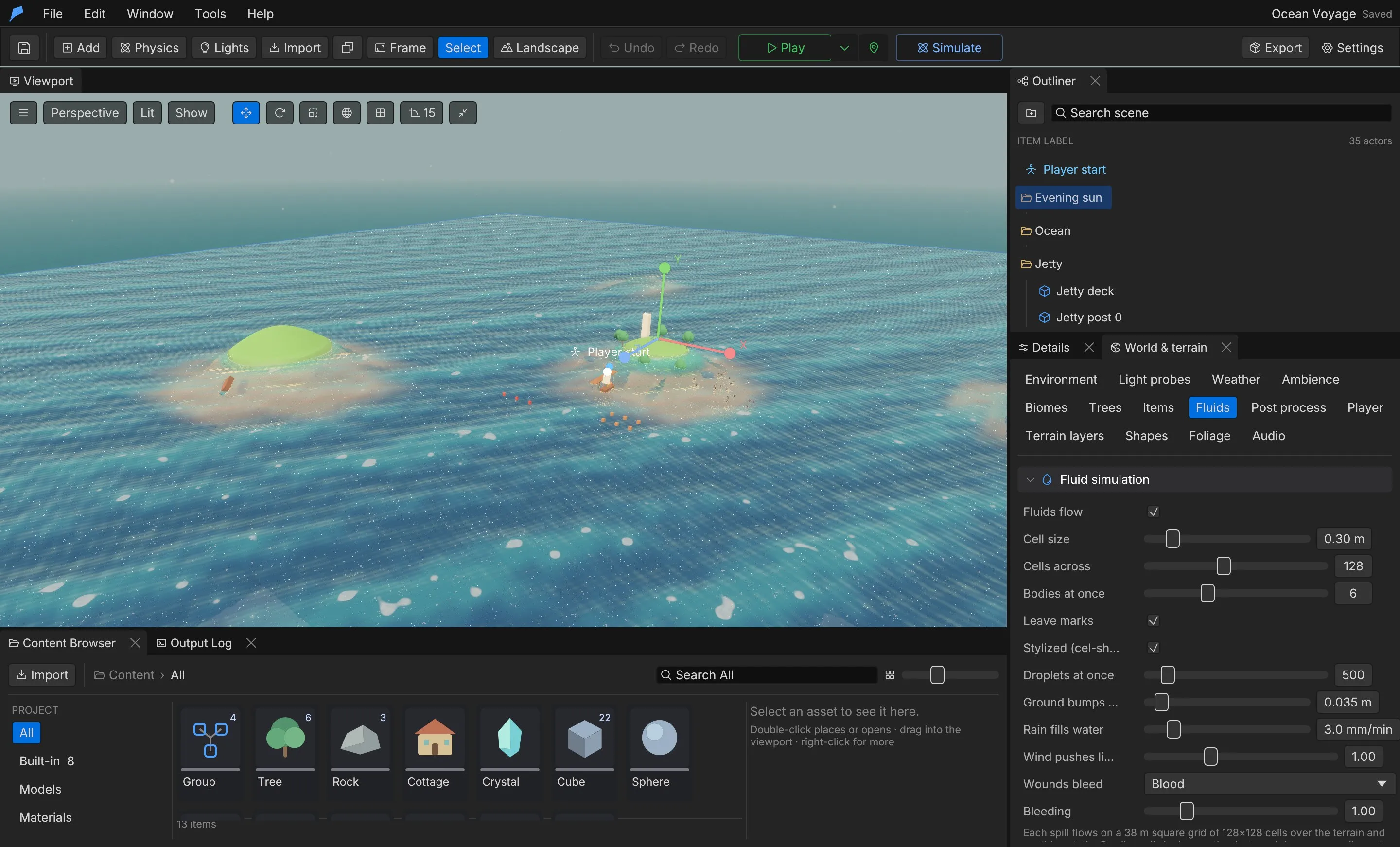
| Setting | Field | Panel range | Default |
|---|---|---|---|
| Fluids flow | enabled |
On/off | On |
| Cell size | cell_size |
0.1–1.5 m | 0.3 m |
| Cells across | cells |
32–256 | 128 |
| Bodies at once | max_bodies |
1–16 | 6 |
| Leave marks | marks |
On/off | On |
| Stylized (cel-shaded) | stylized |
On/off | On |
| Droplets at once | max_drops |
0–5,000 | 500 |
| Ground bumps (rivulets) | ground_detail |
0–0.5 m | 0.035 m |
| Rain fills water | weather.rain_fill |
0–20 mm/min | — |
| Wind pushes liquids | weather.wind_push |
0–3 | — |
Each fluid body is a square grid of Cells across × Cells across cells of Cell size. Larger cells reach further at less detail. The Fluid sounds section sets the volume, the hearing range (5–80 m), and optional project sounds for streams, rivers, waterfalls, lapping, lava, ooze and splashes.
Limits
Section titled “Limits”- Up to 32 fluid bodies at once by command (16 in the panel); each grid is 16–384 cells across with 0.05–4 m cells.
- Up to 5,000 droplets in flight.
- A fluid container holds up to 10,000 m³ and a source pours up to 100 m³/s by command.
- You cannot remove a liquid while objects use it.
Automate it
Section titled “Automate it”This adds an endless ocean to object 5, then fills a lava pit from object 9:
feather-cli --connect .feather-session.json command scene.update \  --json '{"id":5,"patch":{"water":{"ocean":true,"size":[10,30,10],"wave_scale":2}}}'
feather-cli --connect .feather-session.json command scene.update \  --json '{"id":9,"patch":{"fluid_pool":{"fluid":"lava","radius":12}}}'
This makes the interactive surface finer and swirlier over a smaller area:
feather-cli --connect .feather-session.json command project.environment \ --json '{"water":{"interactive":{"enabled":true,"area":40,"resolution":192,"swirl":1.4,"foam":1.2}}}'| Command | Purpose |
|---|---|
scene.update |
Adds water, fluid_pool, fluid_source or fluid_container to an object |
project.environment |
Patches the water look, including the interactive surface simulation |
fluid.get / fluid.set |
Reads and patches the fluid simulation settings |
fluid.upsert / fluid.remove |
Creates, edits or removes a liquid |
See Agents & automation for connecting a live session.