Example projects
The engine repository includes example projects in examples/. Each is an ordinary Feather 2
project that you can open, play, change and export.
Open an example
Section titled “Open an example”-
In the editor, choose File → Open example and pick an example by name. The menu lists every folder in
examples/that contains aproject.feather.json. -
Or open one from a source checkout:
Terminal window cargo run --bin feather-editor -- --project examples/paper-shredder/project.feather.json -
Press Play to try it, and Stop or Escape to return to editing.
The macOS app bundle includes Shred & Sort and Fluid Playground.
Each example ships with a build.py script that generates it using only engine commands, sent over
one MCP session to feather-cli. These scripts double as working examples of driving Feather from
code. Rebuild one with:
cargo build && python3 examples/paper-shredder/build.pyShred & Sort
Section titled “Shred & Sort”The starter the editor opens by default: a recycling depot (32 × 24 metres) where a truck and ceiling pipes keep dumping mixed rubbish — paper, cardboard, plastic bottles, cans, glass and bin bags. The depot starts with no sorting line: you build your own belts and sorters and sort the rubbish into six bins (Paper, Cardboard, Plastic, Metal, Glass, General). The right bin pays, the wrong bin costs a contamination fine, and finishing an order pays a bonus.
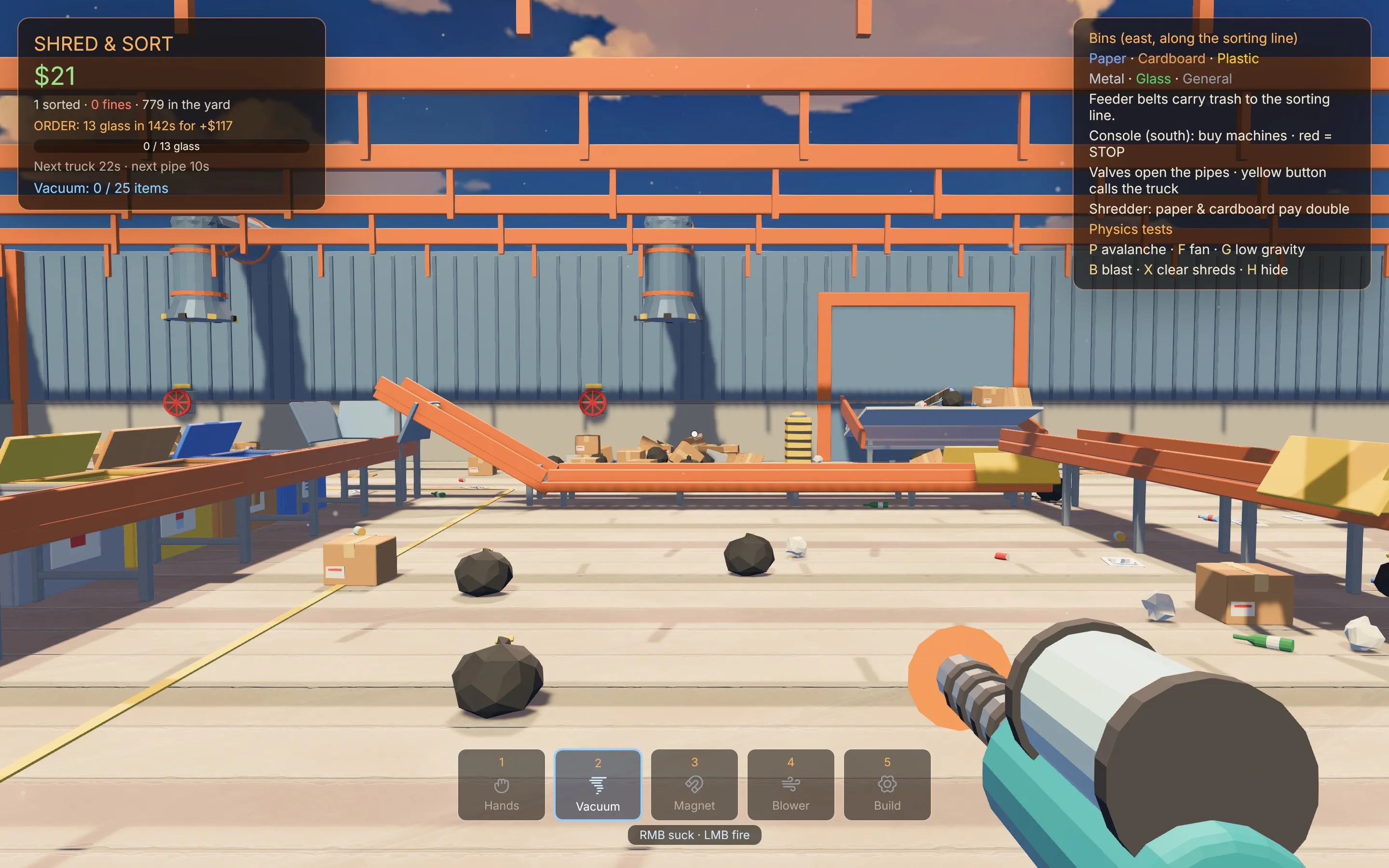
| Input | Action |
|---|---|
| Mouse | Captured when Play starts; Shift+F1 frees it, a click takes it back |
| E | Pick up or put down, or press the button or valve you look at |
| 1–5 / Q | Hold a tool: hands, vacuum gun, magnet gun, leaf blower, build |
| LMB | Throw what you hold; fire the vacuum; launch the magnet’s cluster |
| RMB | Vacuum up trash (25 slots); grab metal; blast a pile with air |
| Z / C | Vacuum gun: choose which material it picks up (All, Paper, Cardboard, Plastic, Metal, Glass, General) |
| Tab | Open a clickable picker: the pieces (build tool) or the vacuum’s material filter. It frees the cursor while open |
| Build tool | LMB place on a 1 m grid, R turn 90°, Z / C choose the piece, X remove (50% back) |
Tool 5 builds the line: belts and turns, loaders, per-material sorter gates, bins and an auto sorter that throws each material onto its own pile. The console sells machines for it, a belt upgrade that speeds up every belt you built, and an emergency stop for every belt and machine. Every number in the game — starting cash, fines, item values, machine prices, truck timing — is a game variable, tunable in the editor even while it plays (see Game variables). Press P, F, G, B, X or H in Play for the physics tests: trash avalanche, fan, low gravity, blast, clear shreds and help.
Shows: runtime copies, conveyor and wind force fields, game variables, held tools and a world script.
Built with build.py.
Ocean Voyage
Section titled “Ocean Voyage”An open sea with rolling waves, five islands, a lighthouse and a sloop. Walk to the sloop and press E to take the helm, then sail with the arrow keys. The hull floats on buoyancy columns and the sail is cloth.
Shows: ocean water, buoyancy, boats and cloth. Built with build.py.
Fluid Playground
Section titled “Fluid Playground”A spring fills a reservoir behind a stone dam above a village. Burst the dam and the flood carves its bed, floats crates and soaks the village, unless you dig a trench or raise a wall first. A volcano pours lava, an oil depot leaks and burns, and a slime pit sits beside the road.
| Key | Action |
|---|---|
| 1–7 | Hold a tool: shovel, earth staff, leveller, water flask, oil flask, fire rod, ice rod |
| C | Use the held tool where you aim |
| B | Burst the dam |
| V | Erupt the volcano |
| F | Flash flood upstream |
| R | Thunderstorm on or off |
| L | Light the oil depot |
| H | Hide or show the help panel |
Shows: flowing fluids with momentum, erosion, terrain tools, fluid pools and sources, and buoyancy.
Built with build.py.
Water Lab
Section titled “Water Lab”A pond for the interactive water surface and the physics components. Wade in and the water swirls round your legs, with foam trailing behind you. A spawner rains wooden balls into the pond that splash, bob and drift on the currents; a world script keeps a whirlpool turning; rocks split the flow into eddies; and a hover drone holds itself above the water on a thruster.
| Key | Action |
|---|---|
| Space | Fire the rocket crate on the shore |
| R | Splash the water where you look |
Every number, such as the whirlpool’s position, size and speed, is a game variable. Shows: the
interactive water surface, the Spawner and Thruster components, centre of mass, script physics
queries (raycast) and water functions (water_stir, water_splash). Built with build.py.
War City
Section titled “War City”A third-person destruction sandbox: a seven-storey tower you can walk into and collapse, apartment blocks built from stacked storey prefabs, explosive cars, and a running battle between allied and enemy squads.
The models are CC0 packs from Kenney and Quaternius and are not included in the repository. Download
the packs listed in examples/war-city/README.md, then build the project:
cargo build && python3 examples/war-city/build.py ~/Downloads/feather-cc0Shows: destruction and structural collapse, combat, AI squads and prefabs. The README also shows a
headless game.simulate run with scheduled blasts whose report lists what broke and what collapsed.
Meadow Expedition
Section titled “Meadow Expedition”A 600 × 600 metre exploration scene generated from the POLYGON Meadow Forest pack. It is not in the
repository: you generate it locally from your own copy of the pack with
scripts/convert_meadow_assets.py and scripts/generate_meadow_project.py, which need Blender and
the built CLI. It is a useful stress test for large imported scenes.
Older examples
Section titled “Older examples”Kinetic Garden, Assembly Garden and World Generation now live in the engine’s tests/fixtures/ as
test scenes rather than shipped examples, and Physics Workshop, Material Study and Physics Showcase
have been removed. The five examples above (plus Meadow Expedition, generated on demand) are what the
repository ships.