Profiler and verification runs
Feather 2 collects runtime statistics in the editor, in Play and in the standalone player. The same
figures are shown in the Profiler panel, returned by the runtime.stats command and written to
--verify-run reports, so a person and an agent measure a change the same way.
Open the profiler
Section titled “Open the profiler”- Choose Window → Profiler, or Profiler… from the viewport’s menu button.
- Press Play to measure the game rather than the editor. The panel keeps updating during Play.
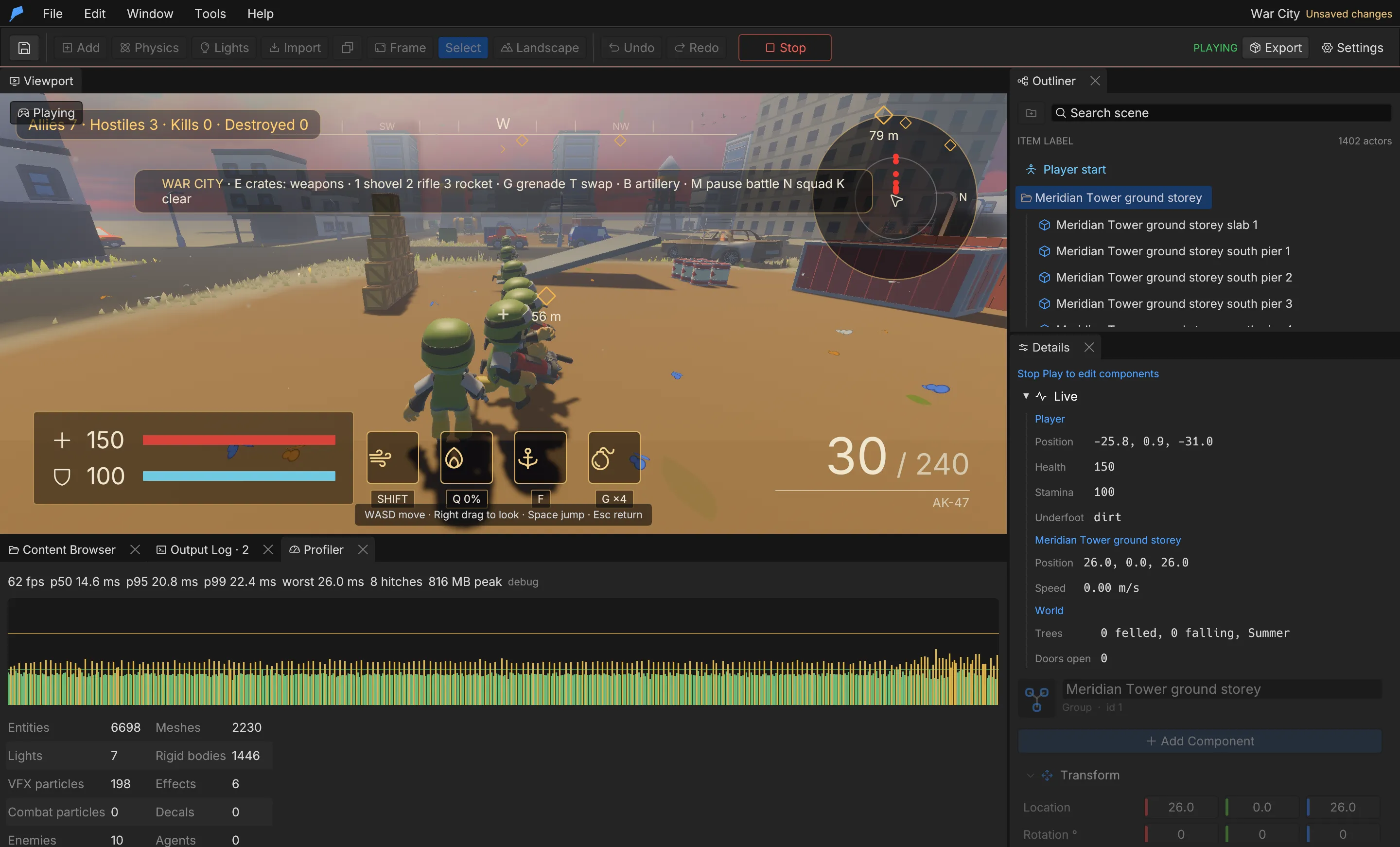
The panel shows average FPS, frame-time percentiles, the worst frame, hitches and peak memory, a
graph of recent frame times with guide lines at 16.7 ms (60 FPS) and 33.3 ms (30 FPS), and a table
of scene counts. It also states whether the build is debug or release.
Statistics
Section titled “Statistics”| Statistic | Description |
|---|---|
frames_sampled |
Frames in the rolling window, up to 600 (about ten seconds at 60 FPS) |
average_fps |
Average frame rate over the window |
p50_frame_ms, p95_frame_ms, p99_frame_ms |
Frame-time percentiles in milliseconds |
worst_frame_ms |
The slowest frame in the window |
hitches |
Frames slower than three times the median |
peak_memory_mb |
Peak resident memory of the process, in MiB |
build |
debug or release |
Counts
Section titled “Counts”| Count | What it counts |
|---|---|
entities, meshes, lights |
Engine entities, rendered meshes and lights |
vfx_particles, vfx_effects, combat_particles, decals |
Particle and decal load |
enemies, agents |
Combat enemies and navigation agents |
sounds_playing |
Active sounds |
rigid_bodies |
Physics bodies |
nav_grid_cells |
Cells in the navigation grid |
Verification runs
Section titled “Verification runs”--verify-run launches the game in a real window, waits for it to load, measures, writes a JSON
report and exits. Both the player and the editor accept it.
feather-player my-game/project.feather.json --verify-run report.json --screenshot report.png- The run waits at least 180 frames and four seconds, until terrain and models have finished loading.
- It samples 120 frame times, then captures the screenshot if you asked for one.
- It writes the report and exits. A run that takes more than 30 seconds beyond its wait is reported as a failure.
Set FEATHER_VERIFY_SECONDS=N to wait N seconds (up to 600) before measuring, for example to check a
later game state.
Report
Section titled “Report”| Field | Description |
|---|---|
success, errors |
Whether the run passed, and model, script and runtime errors |
performance |
Percentiles from the 120 sampled frames, entity count and build type |
runtime_stats |
The full statistics block described above |
models_loaded, render_meshes, score |
Load and gameplay state |
objects |
Each object’s world position, rotation, body, velocity and visibility |
logs, error_count |
Runtime messages |
game_state, story |
World-script state and quest progress |
save_sections |
Systems that keep state in saves |
Systems add their own sections when the project uses them, for example animation, weather,
trees, fire, elements, fluids, inventory, lighting, horizon and climate.
Limits
Section titled “Limits”- Statistics cover the last 600 frames only.
- Peak memory is read from the operating system once per second.
- Verification runs need a desktop session with a real window. For renderer-free checks, use
game.simulate.
Automate it
Section titled “Automate it”In a live editor, start Play, let it run, then read the statistics:
feather-cli --connect .feather-session.json command runtime.play --json '{"playing":true}'feather-cli --connect .feather-session.json command runtime.statsfeather-cli --connect .feather-session.json command runtime.play --json '{"playing":false}'