Destruction
Feather’s destruction system breaks any solid object into Voronoi pieces of its own mesh. Pieces are smaller near the hit, structural parts hold each other up, and a building collapses when its supports are shot out. Blasts near the ground leave craters, and shovels dig holes and trenches. Explosions, bullets, melee, falling bodies and fire all feed the same damage path.
Destruction is off by default. You turn it on per game.
What’s included
Section titled “What’s included”- Eight materials — concrete, brick, stone, wood, glass, metal, plaster and sandbag — each with a density, strength, break pattern, colours and an optional break sound.
- Four break patterns: Chunks, Splinters, Shards and Bricks.
- Structural collapse: parts are glued by contact area and anchored to the ground or static objects; anything that loses its path to an anchor falls.
- Explosive objects, objects that shatter on impact, and second breaks for large pieces.
- Craters, digging, bullet holes, fire and smoke.
- Budgets that cap moving debris, fade small debris and merge resting rubble into one body.
- Ragdolls for combat enemies that die without being blown apart.
Turn on destruction
Section titled “Turn on destruction”- Open Window → Physics and expand Destruction.
- Select Enabled.
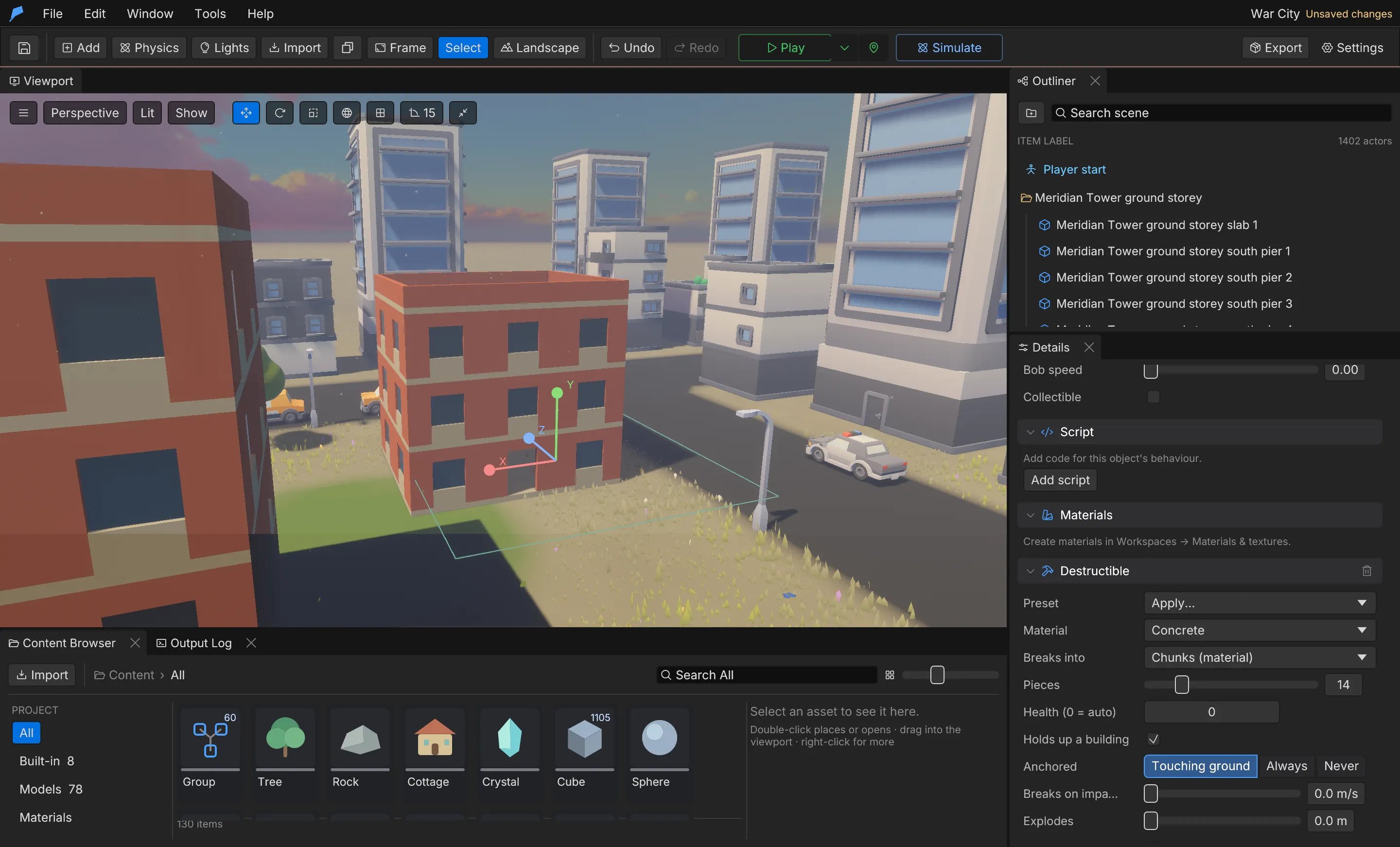
- Either select Everything breaks, so every solid object breaks with a material guessed from its name and surface, or make individual objects breakable.
- To make an object breakable, right-click it and choose Make breakable, or add Details → Add Component → Destructible and pick a Preset.
- Press Play and shoot, throw or blow things up. During Simulate, use the toolbar Blast button and click in the viewport to set off an explosion.
destruction.setup does the project-level work in one step: it enables destruction, adds the
effects destruction_dust, destruction_smoke, destruction_fire and destruction_chips,
matches break and collapse sounds from your project’s sounds by name, and adds an entrenching
shovel to the combat melee weapons.
Presets
Section titled “Presets”| Preset | Result |
|---|---|
auto |
Guesses from the name, surface, kind and size: window → glass, crate → wood, Tree → wood, Rock → stone |
wall |
Concrete wall: structural, 14 chunks |
brick_wall |
Brick wall: structural, breaks into bricks |
pillar |
Concrete pillar: structural, holds up what rests on it |
floor |
Concrete floor or roof slab: structural, rests on walls and pillars |
wood |
Wooden wall, floor, fence or beam: structural, splinters and burns |
window |
Glass pane: shatters from any hit |
door |
Wooden door: splinters, not structural |
crate |
Wooden crate or furniture: loose prop, splinters |
fuel_drum |
Metal drum that explodes in a 4 m blast |
sandbags |
Sandbag wall: tough, soaks up blasts |
vase |
Shatters when it hits the ground; needs a Dynamic body |
bomb |
Explodes in a 5 m blast when it lands; needs a Dynamic body |
Example: a fuel drum that blows up two crates
Section titled “Example: a fuel drum that blows up two crates”You’ll put an explosive drum on the jetty with two wooden crates beside it. Breaking the drum sets off a 4 m explosion that smashes the crates. Start from the Ocean Voyage example project, which already has destruction on.
- Right-click the viewport and choose Add here → Cube. In Details, name it Fuel drum, and under Transform set Location to 0, 15.78, 53 and Scale to 0.7, 1.1, 0.7.
- Add two more cubes the same way: Crate A at −0.6, 15.63, 55.5 and Crate B at 0.6, 15.63, 55.5, both with Scale 0.8, 0.8, 0.8.
- Right-click the drum and choose Make breakable → Fuel drum. In Details → Destructible it now shows Material Metal, Pieces 5 and Explodes 4 m.
- Right-click each crate and choose Make breakable → Crate (Wood, 8 pieces, not structural).
- Select the drum and click Break it now in Details → Destructible. The editor starts Simulate, blows the drum apart, and the crates splinter. Press Reset to put everything back.
Do the same from the command line
Section titled “Do the same from the command line”The three scene.add calls return IDs 36, 37 and 38 in a fresh copy of Ocean Voyage.
feather-cli --workspace /tmp/demo --project project.feather.json command scene.add --json '{"kind":"Cube","name":"Fuel drum","position":[0,15.78,53]}' --save project.feather.jsonfeather-cli --workspace /tmp/demo --project project.feather.json command scene.add --json '{"kind":"Cube","name":"Crate A","position":[-0.6,15.63,55.5]}' --save project.feather.jsonfeather-cli --workspace /tmp/demo --project project.feather.json command scene.add --json '{"kind":"Cube","name":"Crate B","position":[0.6,15.63,55.5]}' --save project.feather.jsonfeather-cli --workspace /tmp/demo --project project.feather.json command scene.update --json '{"id":36,"patch":{"scale":[0.7,1.1,0.7]}}' --save project.feather.jsonfeather-cli --workspace /tmp/demo --project project.feather.json command scene.update --json '{"id":37,"patch":{"scale":[0.8,0.8,0.8]}}' --save project.feather.jsonfeather-cli --workspace /tmp/demo --project project.feather.json command scene.update --json '{"id":38,"patch":{"scale":[0.8,0.8,0.8]}}' --save project.feather.jsonfeather-cli --workspace /tmp/demo --project project.feather.json command destruction.make --json '{"ids":[36],"preset":"fuel_drum"}' --save project.feather.jsonfeather-cli --workspace /tmp/demo --project project.feather.json command destruction.make --json '{"ids":[37,38],"preset":"crate"}' --save project.feather.jsonCheck it worked
Section titled “Check it worked”Set off a small blast on the drum only. Blast positions are world coordinates; the drum’s world
position is [0, 1.9, 53] (the example’s terrain lies well below the sea, and object positions are
terrain-relative):
feather-cli --workspace /tmp/demo --project project.feather.json command game.simulate \ --json '{"frames":180,"blasts":[{"frame":30,"position":[0,1.9,53],"radius":0.5,"damage":200}]}'The report’s destruction.destroyed lists 36, 37 and 38, and pieces is about 33. The logs
show the drum breaking first (broke 1 object(s); 9 pieces) and both crates on the next line
(broke 2 object(s)). Object 35 in the list is the example’s wrecked hull, which breaks as Play
starts.
Destructible settings
Section titled “Destructible settings”| Setting | Field | Description | Default |
|---|---|---|---|
| Material | material |
Concrete, Brick, Stone, Wood, Glass, Metal, Plaster or Sandbag | Concrete |
| Health | health |
0 derives it from the material and the object’s size | 0 |
| Pieces | pieces |
2–64, scaled by quality | 12 |
| Breaks into | pattern |
Chunks, Splinters, Shards or Bricks; null uses the material’s |
Material’s |
| Holds up a building | structural |
Rests on and holds up touching structural objects | On |
| Anchored | anchor |
Auto (touching the ground), Always or Never |
Auto |
| Explodes | explosive |
Blast radius when destroyed, 0–50 m; 0 is not explosive | 0 |
| Leaves pieces | debris |
Off crumbles it to dust | On |
| Breaks on impact at | impact_speed |
Shatters when it hits anything this fast, 0–200 m/s; needs a Dynamic body | 0 (off) |
Materials
Section titled “Materials”| Material | Density (kg/m³) | Health per m³ | Crack share | Glue (kPa) | Pattern | Burns |
|---|---|---|---|---|---|---|
| Concrete | 2400 | 160 | 0.3 | 450 | Chunks | No |
| Brick | 1900 | 120 | 0.25 | 300 | Bricks | No |
| Stone | 2600 | 200 | 0.35 | 500 | Chunks | No |
| Wood | 600 | 70 | 0.2 | 200 | Splinters | Yes |
| Glass | 2500 | 10 | 0 | 60 | Shards | No |
| Metal | 7800 | 500 | 0.6 | 900 | Chunks | No |
| Plaster | 1200 | 40 | 0.15 | 120 | Chunks | No |
| Sandbag | 1600 | 250 | 0.5 | 250 | Bricks | No |
An object cracks into pieces once its damage passes the crack share of its health; 0 shatters at
once. Glue strength sets how much load touching parts carry before the joint gives way. Override
any material with destruction.set {materials: [...]}, one entry per material, including its
inside_color, dust_color and break sound.
Project settings
Section titled “Project settings”| Setting | Field | Range | Default |
|---|---|---|---|
| Enabled | enabled |
On/off | Off |
| Everything breaks | everything |
On/off | Off |
| Quality | quality |
Low, Medium, High, Epic | High |
| Moving pieces | max_debris |
10–5000; past it the smallest turn to dust | 400 |
| All pieces | max_pieces |
50–50,000; past it the oldest small rubble fades | 2500 |
| Small debris lasts | debris_lifetime |
0–3600 s for pieces under 35 cm; 0 keeps them | 25 s |
| Rubble settles / merges | settle_rubble, merge_rubble |
Resting debris freezes, then merges into one body per object | On, On |
| Buildings collapse | collapse |
On/off | On |
| Structure strength | structure_strength |
0.1–10 × every material’s glue | 1 |
| Pieces break again | second_breaks |
Big pieces break on hard landings | On |
| Impacts damage | impact_damage |
Falling and thrown bodies damage what they hit | On |
| Blast / bullet / melee damage × | blast_damage, bullet_damage, melee_damage |
0–100 against structures | 2, 0.2, 0.6 |
| Craters | craters |
Blasts near the ground leave craters | On |
| Crater size | crater_scale |
0.05–2 m of crater per metre of blast radius | 0.4 |
| Digging | digging |
Melee weapons with a dig radius dig the ground | On |
| Bullet holes | bullet_holes |
Bullets leave holes and chip what they hit | On |
| Fire | fire |
Burning materials catch fire in blasts | On |
| Fires burn | fire_seconds |
1–600 s | 30 s |
| Smoke rises | smoke_seconds |
0–600 s | 12 s |
Quality scales pieces and budgets: Low ×0.5, Medium ×0.75, High ×1, and Epic ×1.5 pieces with ×2 budgets.
Ragdolls
Section titled “Ragdolls”When a combat enemy dies and is not blown apart, its animation stops and each hitbox segment — head, chest, upper and lower arms and legs — becomes a dynamic capsule linked to its parent by a ball joint, so the body folds and tumbles down slopes. Severed limbs stay collapsed. Hitboxes are set per enemy archetype; see Combat.
Extend it
Section titled “Extend it”| Function | Description |
|---|---|
damage(id, amount) |
Damages one object |
damage_at(x, y, z, radius, amount) |
Damages everything in a radius, up to 200 m |
blast(x, y, z, radius, damage) |
An explosion: breaks things, craters the ground and lights fires; radius up to 100 m |
crater(x, y, z, radius, depth) |
A crater |
dig(x, y, z, radius, depth), fill(x, y, z, radius, height) |
Digs a hole with soil heaped beside it, or adds ground |
dig_trench(x1, z1, x2, z2, width, depth) |
A straight trench |
dig_tunnel(x1, y1, z1, x2, y2, z2, radius) |
A tunnel |
make_breakable(id[, preset]), make_unbreakable(id) |
Changes breakability during play |
health_of(id) |
Remaining health, 0–1 |
is_destroyed(id) |
Whether the object has broken |
The on_destroyed(id) hook runs in world scripts when a destructible object breaks, from a blast,
bullets, a collapse or a script.
// A world script: open the vault route when the wall comes down.fn on_destroyed(id) { if id == 31 { print("The vault wall is down"); blast(4.0, 0.0, 12.0, 6.0, 400.0); }}Ground edits made during Play are recorded in saves and undone when you stop. See Caves and cutters for authored terrain edits.
Limits
Section titled “Limits”- An object breaks into at most 64 pieces before quality scaling.
- Groups, sensors, water volumes, force fields and objects without a physics body cannot break.
vase,bombandimpact_speedneed a Dynamic body so the object can fall or be thrown.
Automate it
Section titled “Automate it”# Turn destruction on with starter effects and a shovelfeather-cli --connect .feather-session.json command destruction.setup --json '{}'
# Make a whole building group breakable, guessing materials per partfeather-cli --connect .feather-session.json command destruction.make \ --json '{"ids":[50],"preset":"auto"}'
# Preview how object 51 breaks when hit at a pointfeather-cli --connect .feather-session.json command destruction.fracture \ --json '{"id":51,"pieces":16,"hit":[2,1.5,0]}'
# During Play or Simulate, set off a blastfeather-cli --connect .feather-session.json command destruction.runtime \ --json '{"action":"blast","position":[0,1,8],"radius":6,"damage":300}'destruction.fracture returns each piece’s centre, volume, mass and triangle count without a
renderer. game.simulate accepts scheduled blasts and reports what was destroyed and what
collapsed. See Simulation.